Let's talk

Sazinga Sarva · Workforce

Employee Training & Engagement Platform

Publishing the training is easy, finishing it is the hard part

Organisations running internal training in safety, compliance, onboarding and product knowledge

In production — Deployed white-label, so the installations cannot be named.

The Engage manager dashboard on a laptop — completion by team, overdue assignments and the section of each module where people stop reading — beside a module question on a phone, marked immediately with the explanation taken from the section it came from
The portal and the phone. Who has finished and where they stopped reading on one; a question marked on the spot, with the reason, on the other. Both are real captured screens. The devices around them are drawn, not photographed. Engage has no build or branding of its own yet: these are BrainWave's screens renamed, and the assignment, overdue and where-people-stop panels are invented for the workplace version. A real captured Engage screen, on a demonstration tenant's data, composited into a generated photograph.

Engage in use

Every screen below is rebuilt from Engage's own interface and filled with a demonstration tenant's data. They are not captures of a live customer system.

Tap any picture to open it full size.

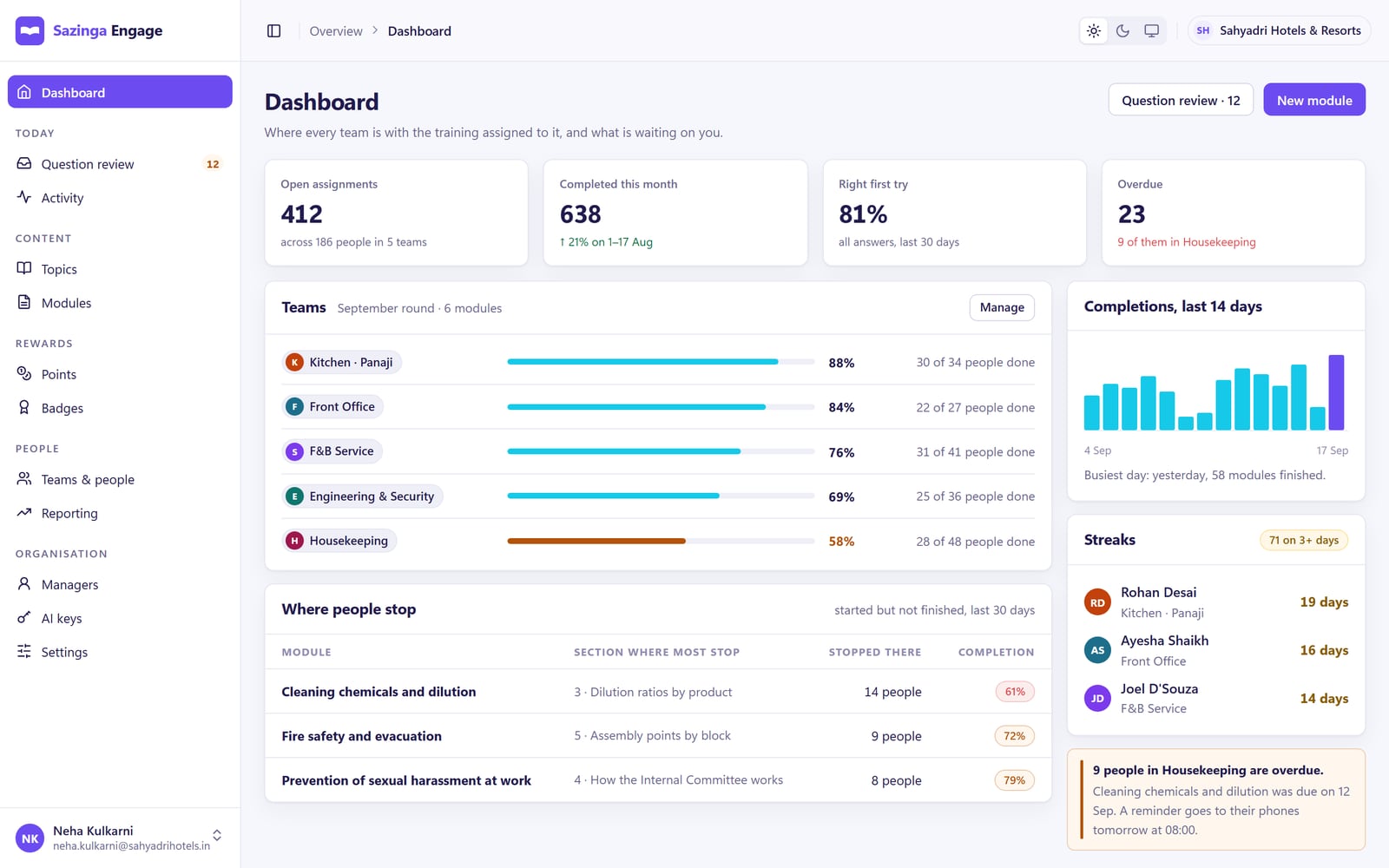
Engage manager dashboard showing open assignments, completions this month, first-try score, overdue count, completion by team and the module sections where people most often stop
The manager dashboard: completion by team, overdue assignments, and the section of each module where people stop reading. Engage is deployed white-label, so we have no captures of a live tenant to publish: this is BrainWave's dashboard renamed, and the assignment, overdue and where-people-stop panels are invented for the workplace version.
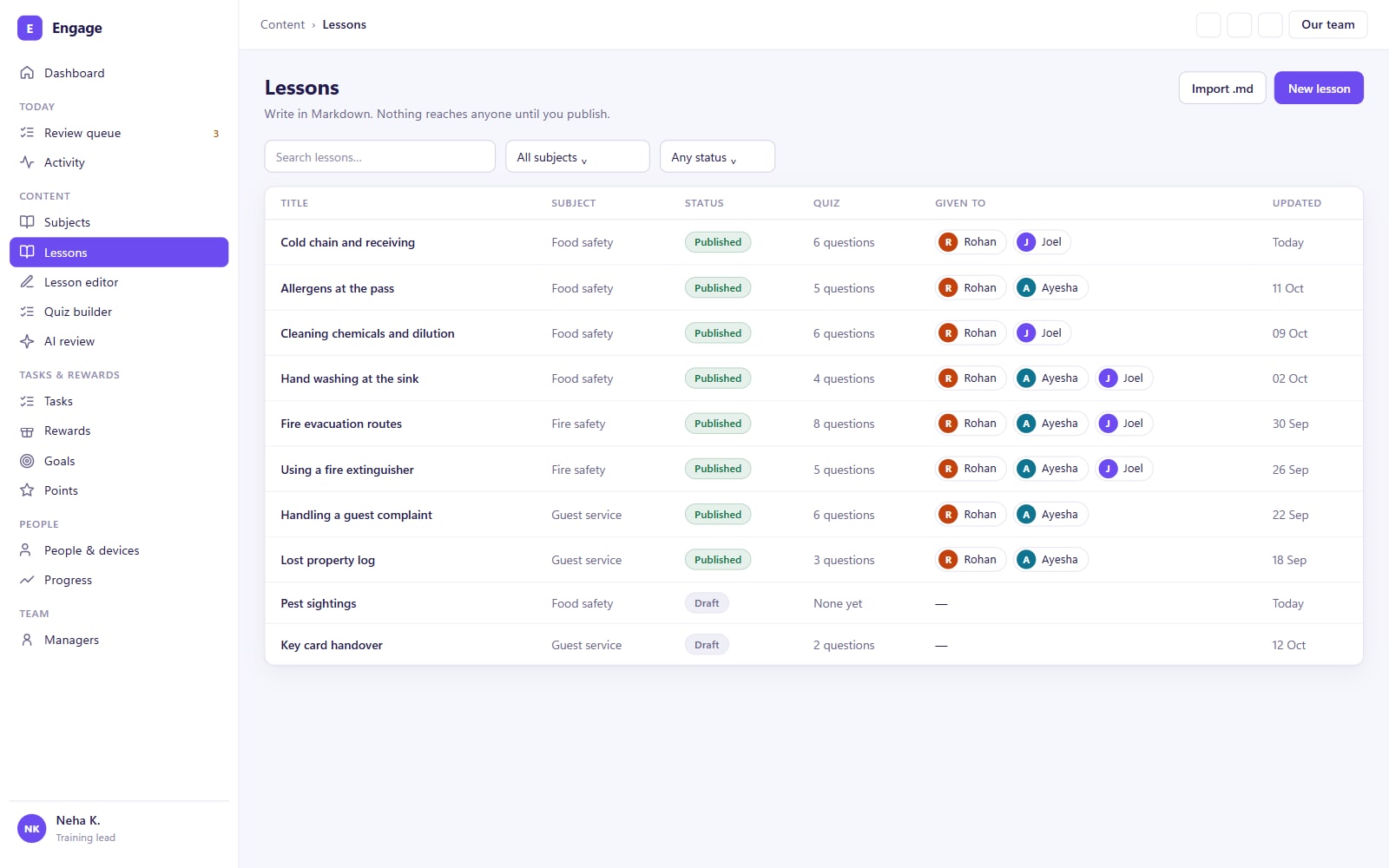
Engage module list with the source document of each module, its topic, step status, question count, assigned teams, completion bar and due date
Each module records the document it was built from, which teams it is assigned to, and how far through it they are. Engage is deployed white-label, so we have no captures of a live tenant to publish: this is BrainWave's lesson list renamed, with the assigned-teams and due-date columns invented for the workplace version.
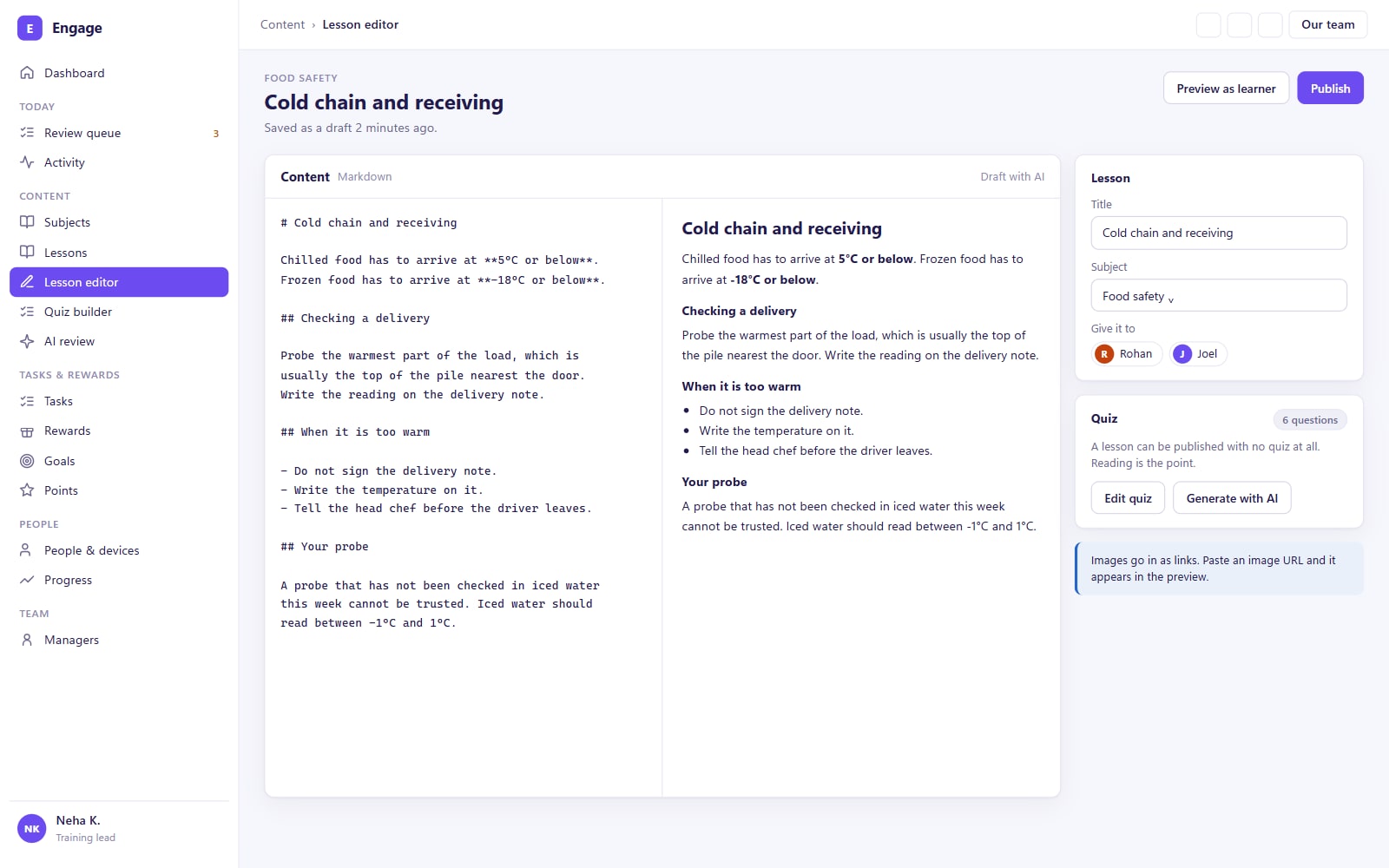
Engage module editor with Markdown on the left, rendered preview on the right, and the uploaded handbook PDF and desk-notice photo listed as source material
Writing a module from an uploaded handbook and a photographed notice. The photo is resized and its location data removed before upload. Engage is deployed white-label, so we have no captures of a live tenant to publish: this is BrainWave's lesson editor renamed, and the source-material list is invented.
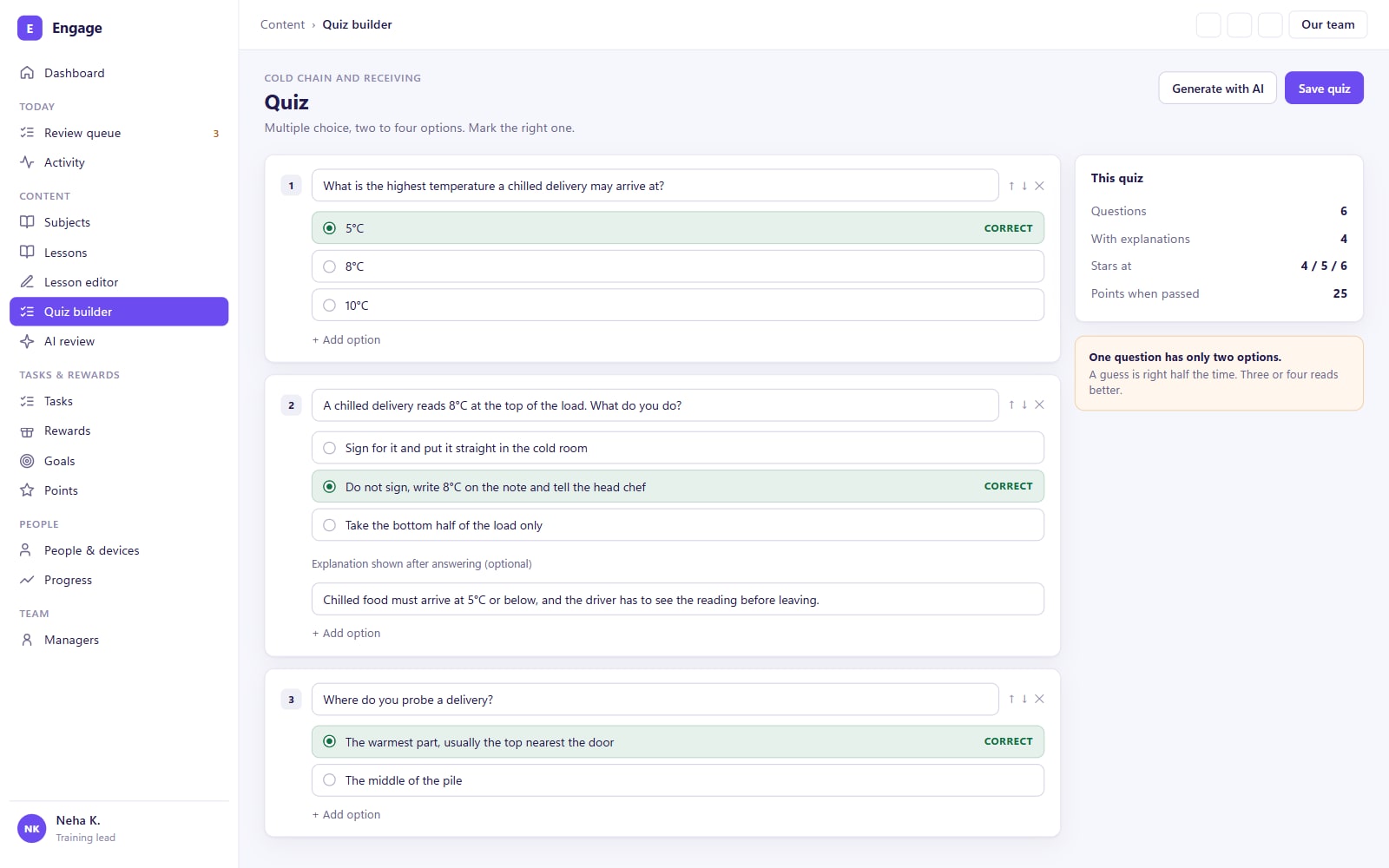
Engage question review screen listing generated multiple-choice questions, each marked accepted or rejected, with the correct option and the section it came from
Generated questions wait for review. One is rejected because its answer is not in the source material, and correct answers are spread across positions A to D. Engage is deployed white-label, so we have no captures of a live tenant to publish: this is BrainWave's question review renamed, and the correct-answer-position chart, the This run card and the section chips are invented.
Engage assign and publish step with Front Office selected, a due date and reminder schedule, a readiness checklist and the points available for the module
Publishing is a separate step: choose the teams, set a due date and reminders, and check the readiness list before the module reaches any phone. Engage is deployed white-label, so we have no captures of a live tenant to publish: this is BrainWave's publish step renamed, and assignment by team, due dates, reminder schedules and the rewards card are invented.
Engage reporting for the Kitchen team on one module, with per-person progress, attempts, best score and stars, and a chart of how many people reached each section
Per-person reporting for one team and one module. The drop at section 3 points to the material, not the people. Engage is deployed white-label, so we have no captures of a live tenant to publish: this is BrainWave's progress page renamed and turned round to one row per person, and the section drop-off chart is invented.

You get something made from your own material, within one working day, and no call unless you ask for one.

Send one training document

A policy, a procedure, a safety briefing. Within one working day we return five comprehension questions generated from it, so you can judge the questions before anyone judges the product.

One file, up to 10 MB. Nothing you send is shared or kept beyond answering you.

A person reads every enquiry and replies within one working day.

Would rather read than write? See the screens above, or the whole platform — seven applications, each one standing on its own.

Most organisations have already solved the publishing half of internal training. The safety induction exists, the compliance refresher exists, the onboarding pack exists. What is missing is the other half. People open a module, get part way in, and never return, and the reporting records an assignment where there should be a demonstrated understanding.

Sazinga Engage takes the material an organisation already has and generates comprehension checks from it, so the questions test the document that was actually issued. Around that sits a reward loop of points, streaks and visible progress, built for one purpose, which is getting people to the end. Reporting then shows not just who enrolled but where in a module people stopped.

What is available today, and what is not

Engage is in production, deployed white-label. That is the part to be precise about: there is no public URL to send you to and no client we can name, because the deployments carry somebody else’s branding rather than ours. There is also no sign-up page, no published price list and no self-serve trial — a walkthrough on a demonstration tenant is how you see it.

The engine underneath is not new. The generation pipeline, the quiz model and the reward loop run in a consumer learning application built on the same stack — a FastAPI and PostgreSQL server with a React Native client — which is where the mechanisms described below come from. The workplace product is that engine given an organisation, roles, assignment by team, and reporting a manager can act on.

One consequence worth stating, because it is visible on this page: the screens below are captures of that consumer application with the labels changed, not of a live Engage tenant, and each says so underneath it. White-label deployment is exactly why we cannot publish the real ones.

Why questions generated from your own material behave differently

A generic question bank tests the topic. A question generated from the document you issued tests the document you issued. That distinction is the reason to do the harder thing, and it changes what a pass means: answering correctly demonstrates having read your safety brief, not general familiarity with safety.

Photographs of printed material work as an input, which matters more than it sounds — most organisations’ real training content is a laminated procedure on a wall or a page in a binder, not a tidy PDF. Images are downscaled and re-encoded on the device before they are sent anywhere, which is not a bandwidth optimisation but a privacy step: re-encoding drops the EXIF block, and that block contains the coordinates of the room the photograph was taken in. A file already small enough is re-encoded anyway, because skipping that pass to save work would switch location stripping off for precisely the pictures taken closest to home.

How the generation is made reliable rather than lucky

Language models fail intermittently, and a training platform that shrugs at a failed generation puts the work back on the person who was trying to publish. Three mechanisms, all measured rather than assumed.

The request carries a real response schema rather than an instruction to return JSON. Asking a model for JSON guarantees only that the reply parses — an empty object is valid JSON and a useless answer, and it fails a layer later as a confusing parse error rather than as a bad generation.

Failures are classified before they are retried. An unusable reply gets up to three further attempts against the same credential, with the sampling temperature nudged so the model genuinely re-rolls rather than returning the same thing. A rate limit, a rejected credential or a network error moves straight on to the next provider, because repeating those changes nothing.

Every attempt is recorded — provider, model, number of attempts, duration and outcome — so the question “is generation working” is answered from a table rather than from an impression. That record is also what a usage allowance is counted from.

The detail that decides whether a quiz is any good

The position of the correct answer. A set of questions written by hand, or generated one at a time, drifts towards putting the right answer in the same place, and learners find that pattern long before they find the material. Engage places correct answers by a generated rotation across the option positions rather than leaving it to whoever wrote the question — an approach that came directly from a batch of 150 questions where every answer was option one.

Why publishing is a separate act

A quiz is created as a draft and stays invisible to learners until it is explicitly published. A learner’s device only ever offers published material and refuses an attempt against anything else.

This is deliberate friction. The alternative — content that goes live the moment it is saved — means half-written questions reach people, and the correction arrives after they have answered them. The cost of the separation is that a module can be published with no quiz attached, so publishing warns when it would leave a learner with material and nothing to answer.

What the reward loop is actually made of

Points earned per correct answer, a streak counted in consecutive active days, badges, and per-item progress that lets someone continue where they stopped. The learner-facing loop — read, answer, see the reward — runs entirely on the device and touches the network zero times; synchronisation happens in the background afterwards.

Two kinds of record sit behind it, on purpose. Progress is stored per item, and the aggregate counters are stored separately. A lost counter update costs a number that can be recomputed from the per-item records; it never costs the history of what somebody actually completed.

What it does not do

It does not author your training. It generates comprehension checks from material you supply, and somebody in your organisation still has to review them before they go out — the review step is part of the design, not an oversight.

It is not a compliance register. It records that a module was completed and when; it does not track the certificate that results, its expiry, or the obligation that required it. That is Sazinga Comply, and the two are being built to meet at the point where a completion becomes evidence.

It also does not do video hosting, live sessions, SCORM import or accredited course delivery, and it is not a substitute for training that legally requires an assessor in the room.

Where to go next

The sectors this is aimed at first are the ones where training is issued, evidenced and audited rather than merely offered: food safety, construction and healthcare. If your immediate problem is proving that certification is current rather than that people understood the material, start with Sazinga Comply instead — and note that it is also still in build.

Engage on a phone

Swipe for the other screens.

Engage employee app home screen with a points balance, an 18-day streak, the module due next with its progress bar, and progress by topic
The employee's home screen: the next module due, how much of it is left, the current streak and the points balance. Engage is deployed white-label, so we have no captures of a live tenant to publish: this is BrainWave's home screen renamed with workplace content, and the due date on the next module is invented.
Engage module list on a phone, split into to-do modules with due dates and completed modules with star ratings
Assigned modules with due dates, a mark for those saved for offline reading, and the stars earned on finished ones. Engage is deployed white-label, so we have no captures of a live tenant to publish: this is BrainWave's lesson list renamed with workplace content, and the due-date chips and the To do and Done split are invented.
Engage reader showing section 3 of a cold chain module on probe calibration, with a diagram, a progress bar and a next-section button
Reading a module one section at a time. The content is cached on the phone, so it opens with no signal.
Engage quiz question 5 of 8 with the chosen wrong answer marked in red, the correct answer marked in green and an explanation below
Each answer is marked straight away, with a short explanation taken from the section the question came from.
Engage results screen showing 7 out of 8, two of three stars, 50 points added and the new balance of 365 points
The result screen after a quiz: score, stars, points broken down by answers and completion, and the updated streak.
Engage progress screen with a 19-day streak, modules completed, stars, average score, earned and locked badges, and a weekly points table for the Kitchen team
Streak, badges and a weekly points table for the employee's own team. Engage is deployed white-label, so we have no captures of a live tenant to publish: this is BrainWave's trophies screen renamed, and the weekly team points table is invented.

What Engage does

Your material, your questions

Upload the handbook, the safety brief, the standard operating procedure or the product sheet you already have. Comprehension checks are generated from that material rather than from a generic question bank, so the questions test what you actually issued.

A reward loop that reaches the end

Points for correct answers, streaks for returning, and a progress bar that shows how much of a module remains. The loop is aimed at completion rather than at enrolment, because enrolment was never the number that was short.

Completion and comprehension reporting

For each person, what was assigned, how far they got, what they answered and when. A module that people abandon at the same point is visible in the data, which is usually a problem with the material rather than the people.

Built for a phone

Delivered as a mobile app so training happens in short sessions between other work, rather than requiring a desk, a laptop and an hour that nobody has.

Built around how the work actually runs

  • Questions are generated from the material you upload, not a generic bank
  • Progress, points and streaks are aimed squarely at completion rates
  • Reporting shows where in a module people stop, not just who enrolled
  • Short mobile sessions suit shift workers and site teams without a desk
  • Suits safety, compliance, onboarding and product knowledge alike

What we found and fixed while building Engage

Each of these is a real problem from a live installation, what it cost, and what changed.

Sazinga Engage — frequently asked questions

What is Sazinga Engage?

Sazinga Engage is an employee training and engagement platform. You supply the training material, it generates comprehension checks from that material, and a reward loop of points, streaks and visible progress is used to drive people through to completion rather than only to enrolment.

Is it available now?

Yes. It is in production and deployed white-label, which is why we cannot point you at a live URL or name the organisations running it. A walkthrough on a demonstration tenant is the way to see it.

Where do the questions come from?

From the material you upload. The handbook, procedure, safety brief or product sheet is processed and comprehension checks are generated from its content, so answering correctly demonstrates having read the document you issued rather than general knowledge of the topic.

Why focus on completion rather than content delivery?

Because publishing training is already solved and finishing it is not. An assigned module that is opened and abandoned produces a record of assignment and no comprehension, which is the gap the reward loop of points, streaks and progress is built to close.

What kind of training does it suit?

Internal training an organisation is responsible for issuing and evidencing, such as safety inductions, compliance refreshers, new-starter onboarding and product knowledge for sales and service staff.

What can managers see?

Per person, the modules assigned, how far through each one they are, the answers given and the dates. Aggregated across a team, it shows completion rates by module and the point within a module where people most often stop.