Let's talk

Sazinga Sarva · Manufacturing

Quotation & CPQ Software for Made-to-Order Manufacturing

The pricing formula, out of the spreadsheet and under control

Made-to-order manufacturers and fabricators whose prices are calculated from dimensions and options rather than picked from a list

In production — Eleven installations — six in the Gulf, four in Africa and one in the USA — some of them under a partner's own brand (September 2026).

The Quote dashboard on a laptop — quotation count, approvals waiting, revenue by month and the latest quotations — beside a quoted item on a phone, shown in 3D from the customer's own quote link
The portal and the customer's link. Quotes out and approvals waiting on one; the item itself in 3D, opened by the customer with no account, on the other. Both are real captured screens. The devices around them are drawn, not photographed. Revenue on the dashboard card is shown in US dollars; the application formats amounts in rupees and uses a rupee icon there. A real captured Quote screen, on a demonstration tenant's data, composited into a generated photograph.

Quote in use

Every screen below is rebuilt from Quote's own interface and filled with a demonstration tenant's data. They are not captures of a live customer system.

Tap any picture to open it full size.

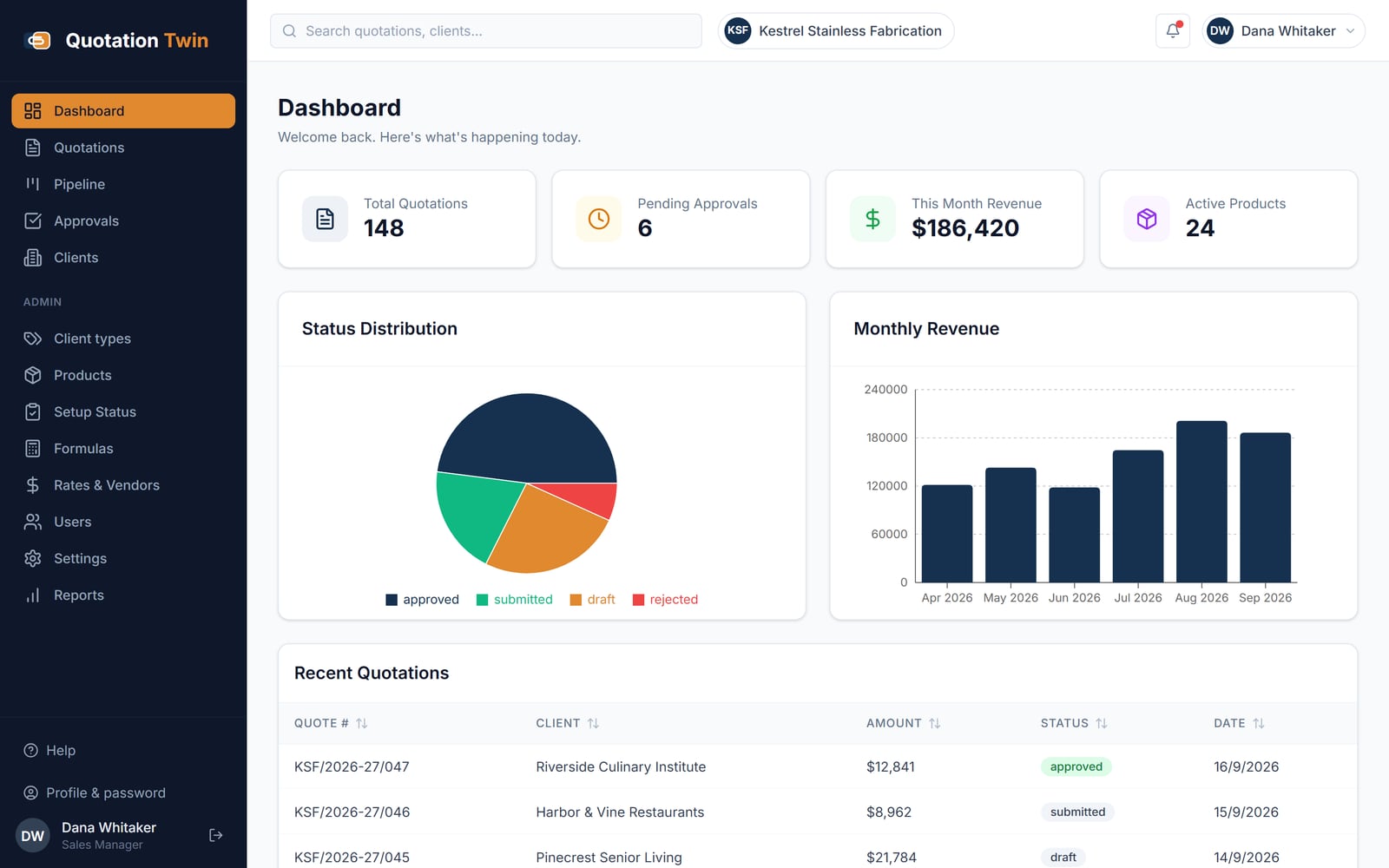
Quotation Twin dashboard for a stainless fabricator showing quotation count, pending approvals, monthly revenue in US dollars, a status chart, a revenue chart and recent quotations
Dashboard: quotation count, approvals waiting, revenue by month and the latest quotes
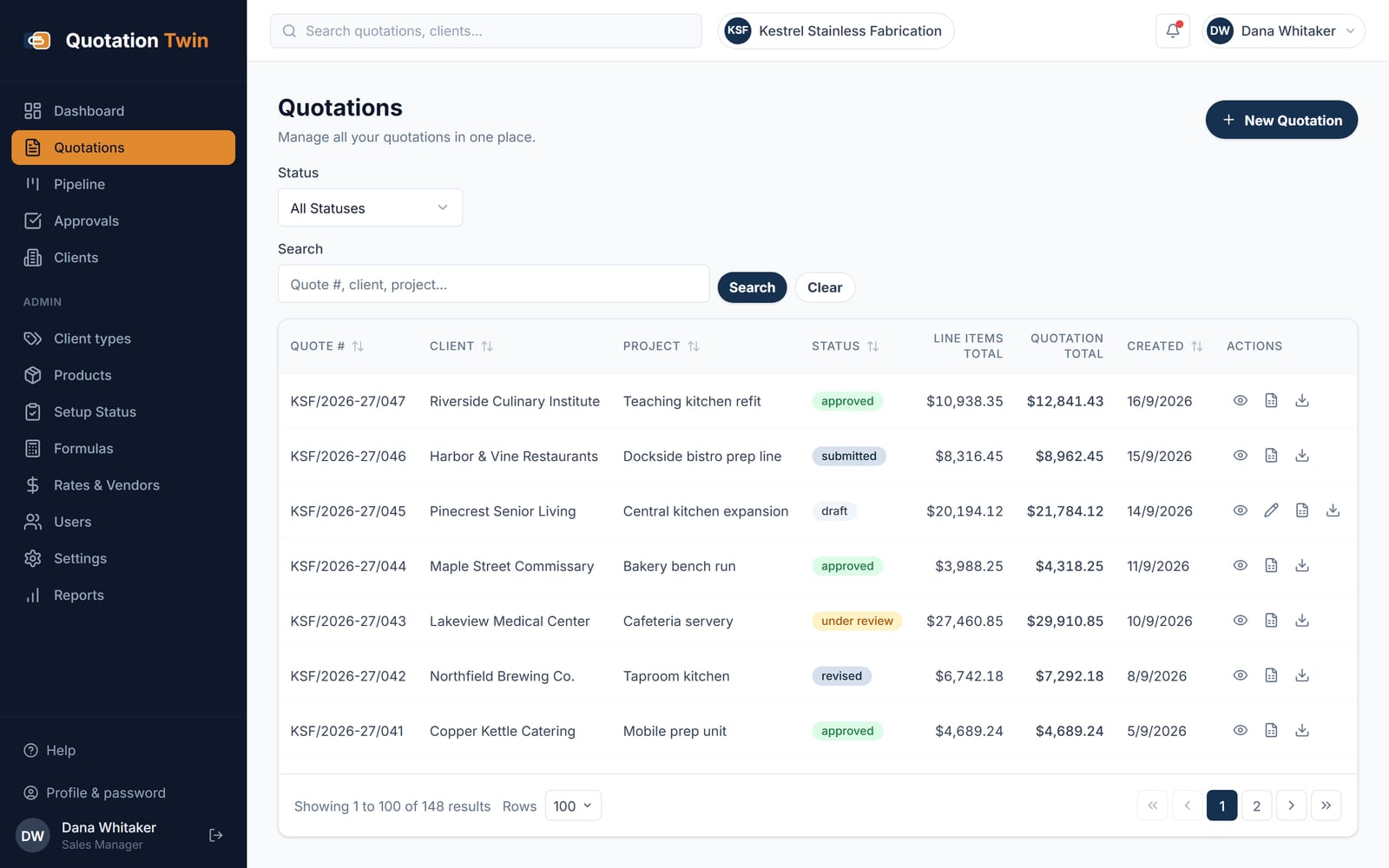
Quotations list with quote numbers, clients, projects, status badges, line-item and quotation totals, and view, Excel and PDF actions on each row
Every quotation with its status, line-item total and final total, filterable by status
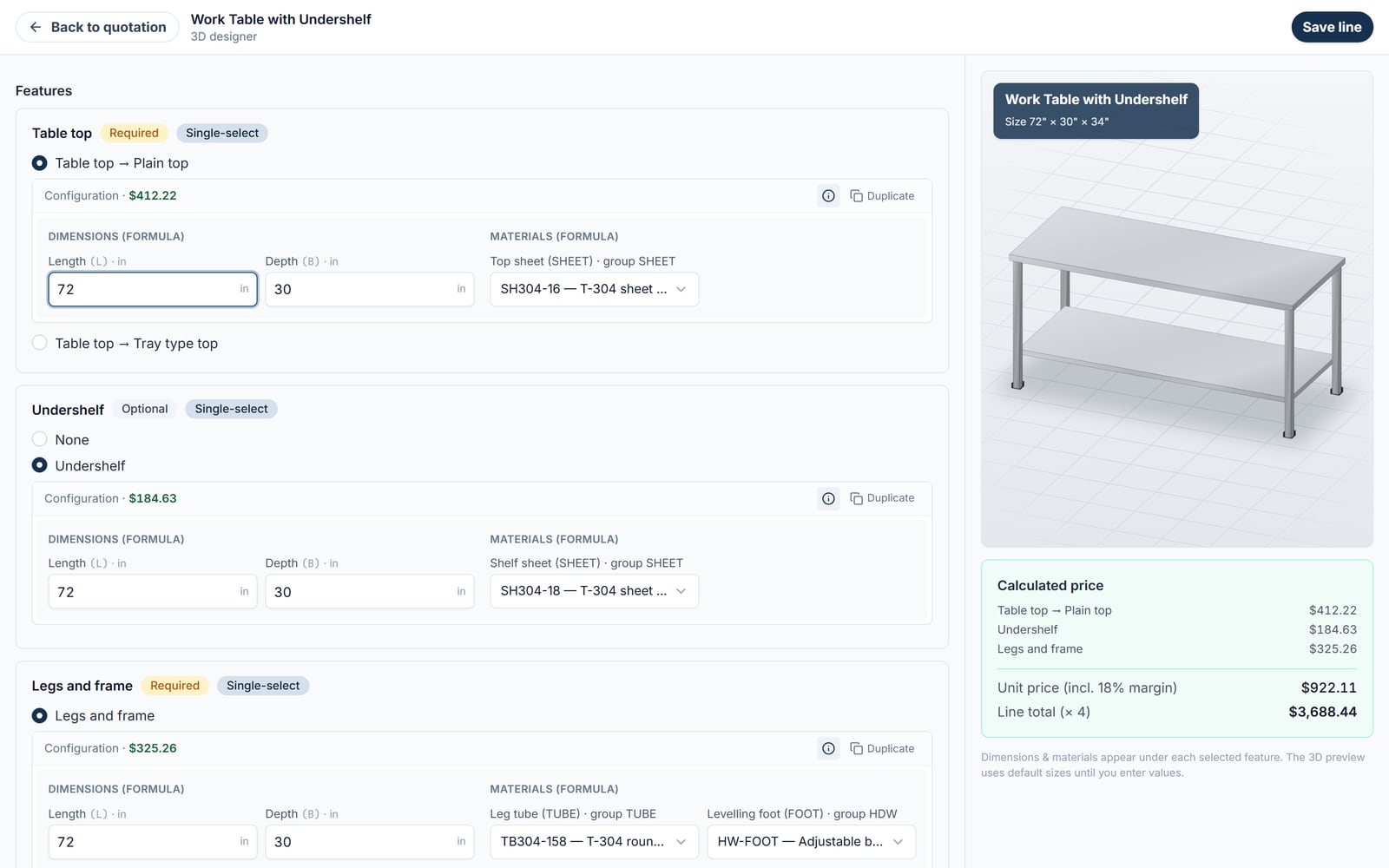
Full-screen 3D designer for a work table with undershelf, with feature groups, dimensions and sheet materials on the left and a 3D model and calculated price on the right
Dimensions and materials entered per feature; the 3D model and the price are built from the same values
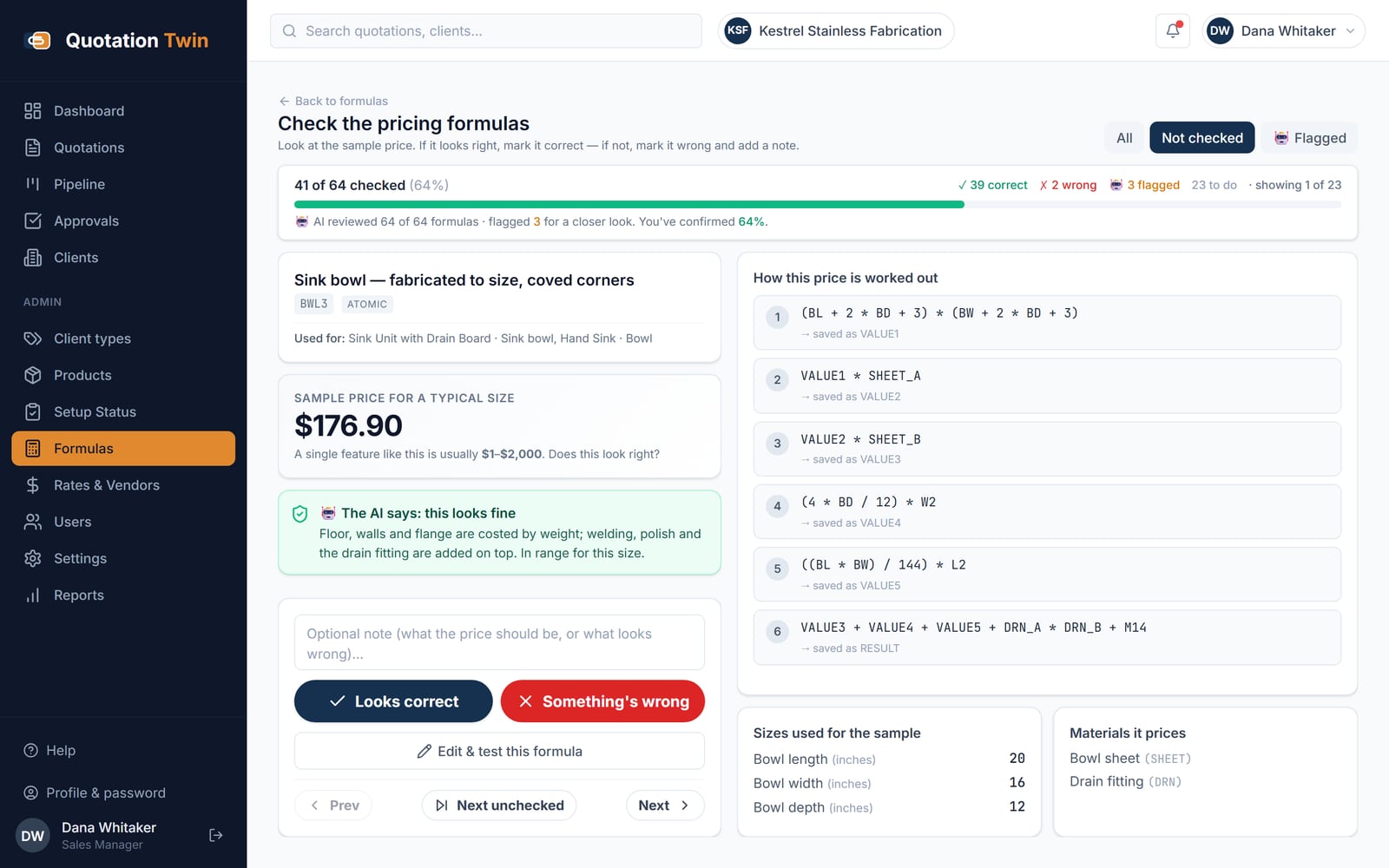
Formula check screen showing a sink-bowl pricing formula, its sample price, an AI review note, the six calculation steps and buttons to mark it correct or wrong
Each pricing formula is priced at a sample size, reviewed by the AI and signed off by a person
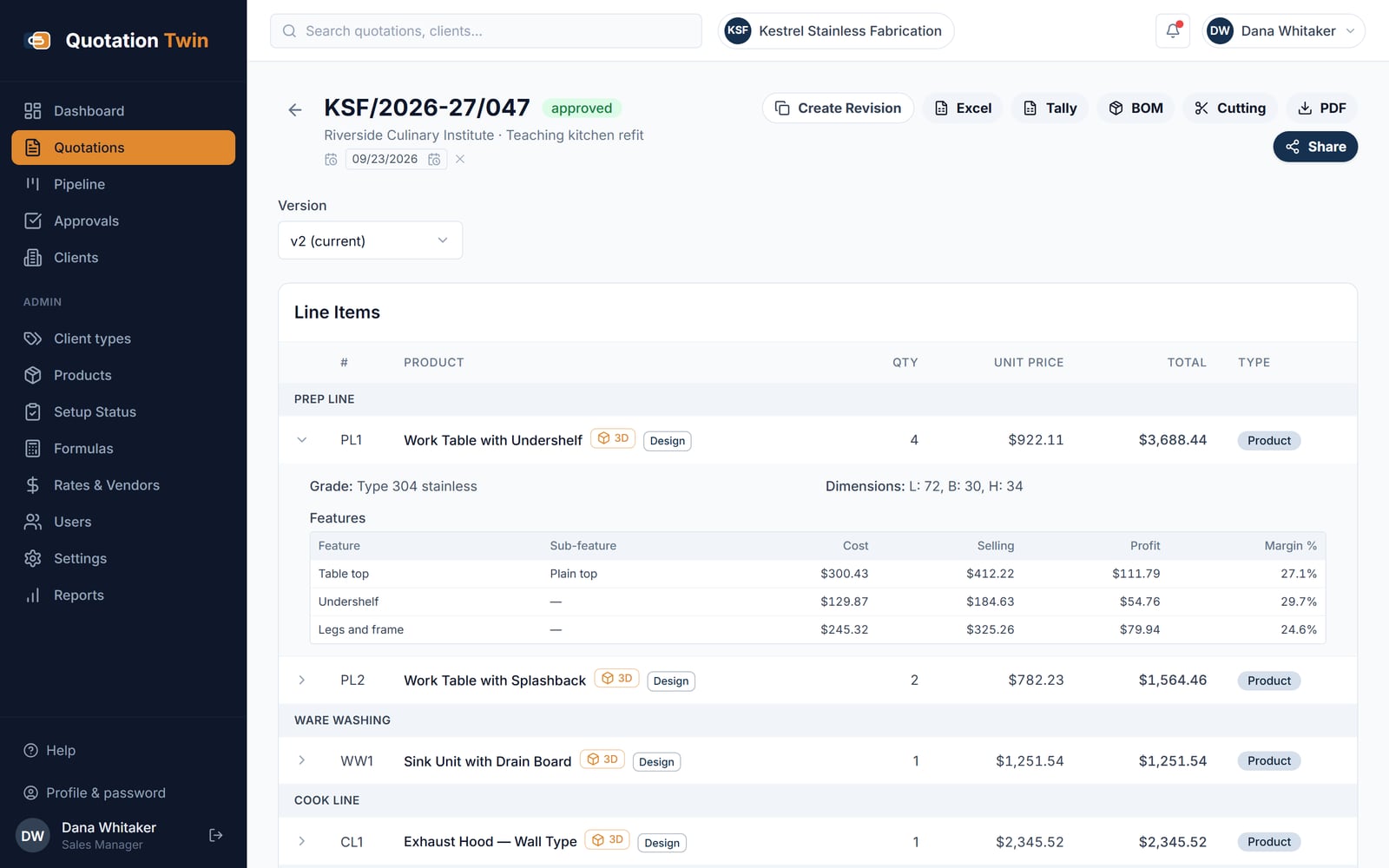
Quotation detail for version 2 of an approved quote, with sections, line items, 3D and Design buttons, and an expanded line showing cost, selling price and margin per feature
Version 2 of an approved quote, with cost, selling price and margin shown per feature
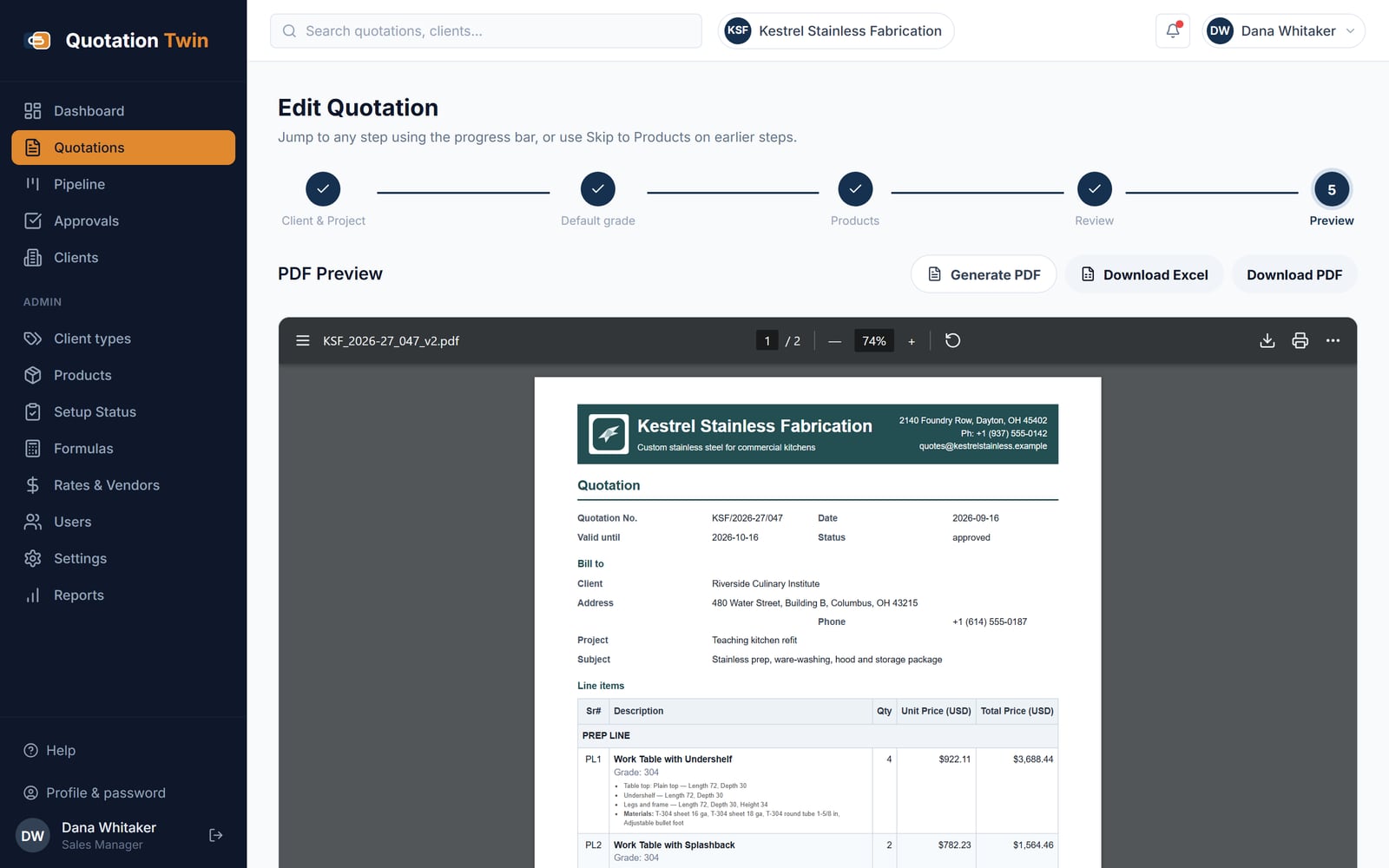
Last step of the quotation wizard showing the generated PDF with the fabricator's own header colour, logo, address, bill-to details and line items with feature breakdowns
The PDF is generated from the quote record in the fabricator's own colours and logo

You get something made from your own material, within one working day, and no call unless you ask for one.

Send one quotation you have already sent a customer

A PDF or a spreadsheet. Within one working day we return where each figure on it came from and where a governed formula would have given a different number, so you can judge whether your pricing holds before you move it anywhere.

One file, up to 10 MB. Nothing you send is shared or kept beyond answering you.

A person reads every enquiry and replies within one working day.

Would rather read than write? See the screens above, or the whole platform — seven applications, each one standing on its own.

Bespoke manufacturers price from formulas, and those formulas usually live in a spreadsheet that has been copied, adapted and emailed for years. Each salesperson ends up with a slightly different version, a margin change takes weeks to reach everyone, and the customer receives a PDF attachment that is out of date the moment a dimension changes.

Sazinga Quote holds the pricing rules centrally and versions them, so a quote is priced by the current formula rather than by whichever copy was open. The configured item is drawn in 3D from the same parameters that price it, the quote goes to the customer as a link that stays current, and the workshop gets the costing behind it in the same click.

Quote on a phone

Swipe for the other screens.

Customer's phone showing a shared quote link with the fabricator's header, who it is prepared for, and priced line items with feature tags and View in 3D buttons
The customer opens the quote link on a phone, with no account or login
Lower part of the shared quote on a phone with the last two line items, the quotation total, notes and terms
Totals, notes and terms on the same link, always showing the current version
3D preview of a two-bowl sink unit with drain board and splashback, opened from the shared quote on a phone
The customer can view each quoted item in 3D from the link
Share this quote dialog on a phone with the private link, a Copy button, a Share on WhatsApp button and options to regenerate or turn off the link
Staff create the link, copy it or send it on WhatsApp, and can revoke it later
Quotations list on a phone laid out as cards, each with quote number, status, client, project, totals, created date and action buttons
On a phone the quotations table becomes one card per quote
3D designer on a phone with a work table model at the top, the calculated price below it and the table-top dimensions underneath
The 3D designer on a phone: model first, then the price, then the inputs

What Quote does

Governed formula pricing

Each product feature carries its own pricing formula, driven by dimensions, material, gauge and options. Formulas are held centrally and versioned, so a sales user applies the current rules rather than a copy of last year's sheet.

Parametric 3D preview

The configured item is drawn from the same parameters that price it. Change a length or a material and the preview and the price move together, so the customer sees what they are agreeing to before it is made.

Shareable quote links

Every quote has a public link that can be sent to a customer without an account or a login, and shared straight to WhatsApp. The recipient sees the current version rather than an attachment that has since changed.

Branded PDF and Excel output

The same quote exports as a branded PDF for the customer and a costed spreadsheet for the workshop, both generated from the quote record so the two cannot disagree with each other.

Built around how the work actually runs

  • Pricing rules live in one place and are versioned, not copied between files
  • A quote and its 3D preview are generated from the same parameters
  • Public quote links share to WhatsApp without the customer signing in
  • PDF for the customer and Excel for the workshop come from one record
  • Changing a dimension reprices the line rather than requiring a rebuild

What we found and fixed while building Quote

Each of these is a real problem from a live installation, what it cost, and what changed.

All 29 articles from Quote and the rest of the platform

Sazinga Quote — frequently asked questions

What is Sazinga Quote?

Sazinga Quote is quotation and CPQ software for made-to-order manufacturing. It prices bespoke items from governed per-feature formulas driven by dimensions and options, shows a parametric 3D preview of the configured item, and issues the quote as a shareable link, a branded PDF and a costed spreadsheet.

Who is it for?

Manufacturers and fabricators who quote items that are made to order, where the price is calculated rather than looked up. The starting point is commercial-kitchen and stainless-steel fabrication, and the same formula engine applies to interior fit-out, modular furniture, sheet metal and signage.

How is it different from quoting in Excel?

The formulas are held centrally and versioned rather than copied into each salesperson's workbook, so every quote uses the current rules. Quotes are records rather than files, which means a quote can be reopened, revised and re-shared through the same link instead of becoming another attachment.

What does the 3D preview do?

It draws the configured item from the same parameters used to price it. Adjusting a dimension, material or option updates the preview and the price at the same time, so a specification error is visible at quoting rather than at fabrication.

How does the customer receive the quote?

Through a public link that needs no account or login, shareable directly to WhatsApp, and through a branded PDF. The link always shows the current version of the quote, so a later revision does not leave an outdated attachment in circulation.

Can the workshop get the costing behind a quote?

Yes. The same quote exports to Excel with the line-by-line costing behind the customer price. Both outputs are generated from the one quote record, so the workshop sheet and the customer document cannot fall out of step.