
Steps you can read
Each step is one expression storing its result for the next — sheet weight, then sheet cost, then labour, then the total. The estimator sees the working, not a black box.
Sazinga Quote is built for businesses whose price depends on the size of the thing they are making. Everything below exists today — where something has a real limit, it says so.
The core
A formula prices one feature of one product. It is an ordered list of steps over your dimensions, your material rates and your labour codes — the same shape as the spreadsheet it replaces, except that it is governed, testable and identical for every estimator.
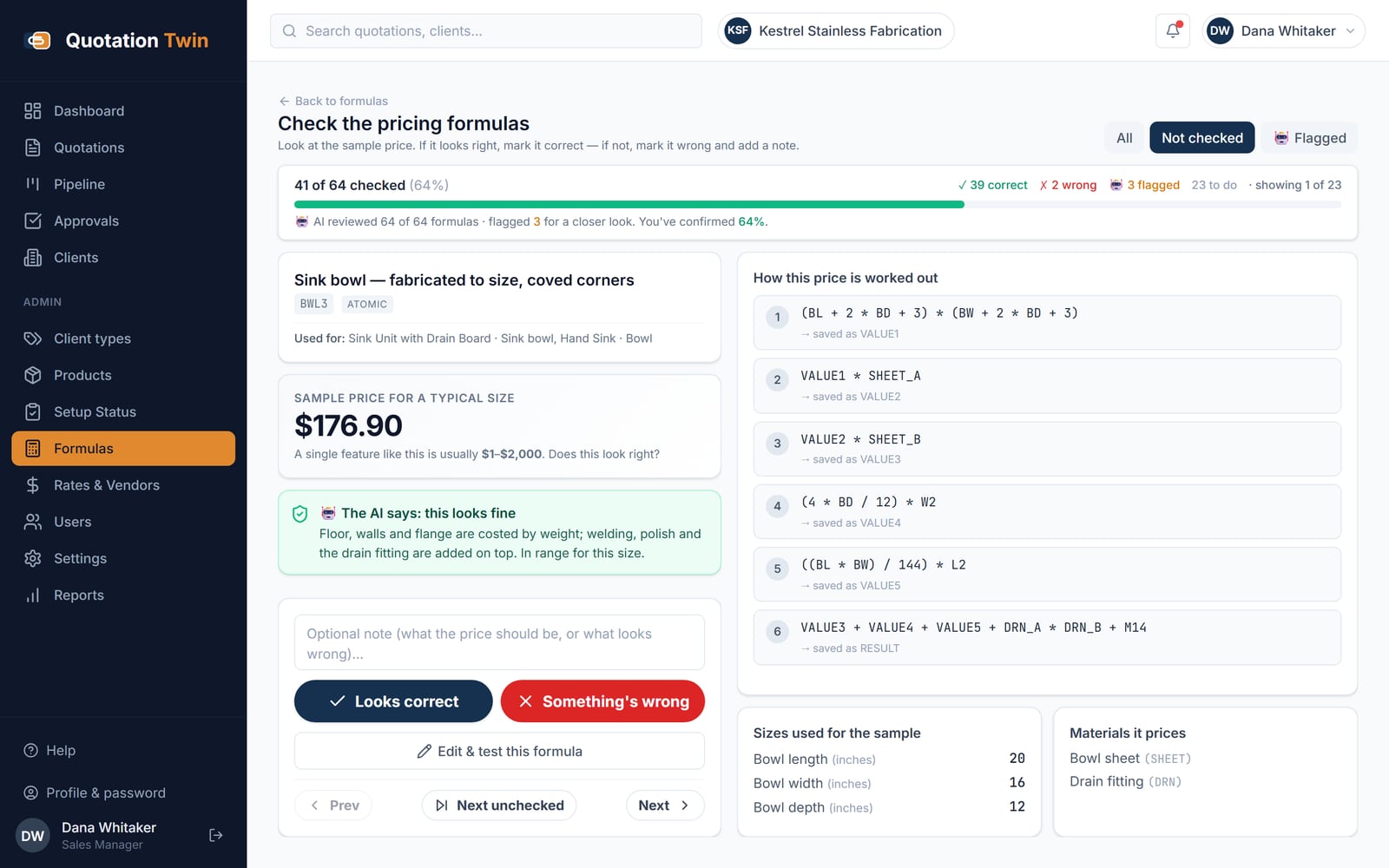
Each step is one expression storing its result for the next — sheet weight, then sheet cost, then labour, then the total. The estimator sees the working, not a black box.
A formula declares what it consumes: a sheet slot, a tube slot, a hardware slot. At quote time the right item is resolved for the chosen grade, and its rate and conversion factor enter the arithmetic.
Labour and consumables are referred to by code — L1, L2, M14 — and resolved from your service and material masters at price time. Change the labour rate once and every later quotation follows.
One formula can call others and branch on a dimension, so a product whose pricing genuinely changes above a certain size is expressed as that, rather than as two products.
Expressions are parsed and checked against a whitelist before evaluation. No function calls, no attribute access, no code execution — a formula cannot do anything except add, subtract, multiply and divide.
Run a formula in the editor with sample dimensions and materials and read the step-by-step trace. Slot and expression errors are caught when you save, not when a customer is waiting.
Your catalogue
Model the catalogue the way the shop floor already thinks about it: a product type has features, a feature may have variants, and a formula is mapped to that combination.
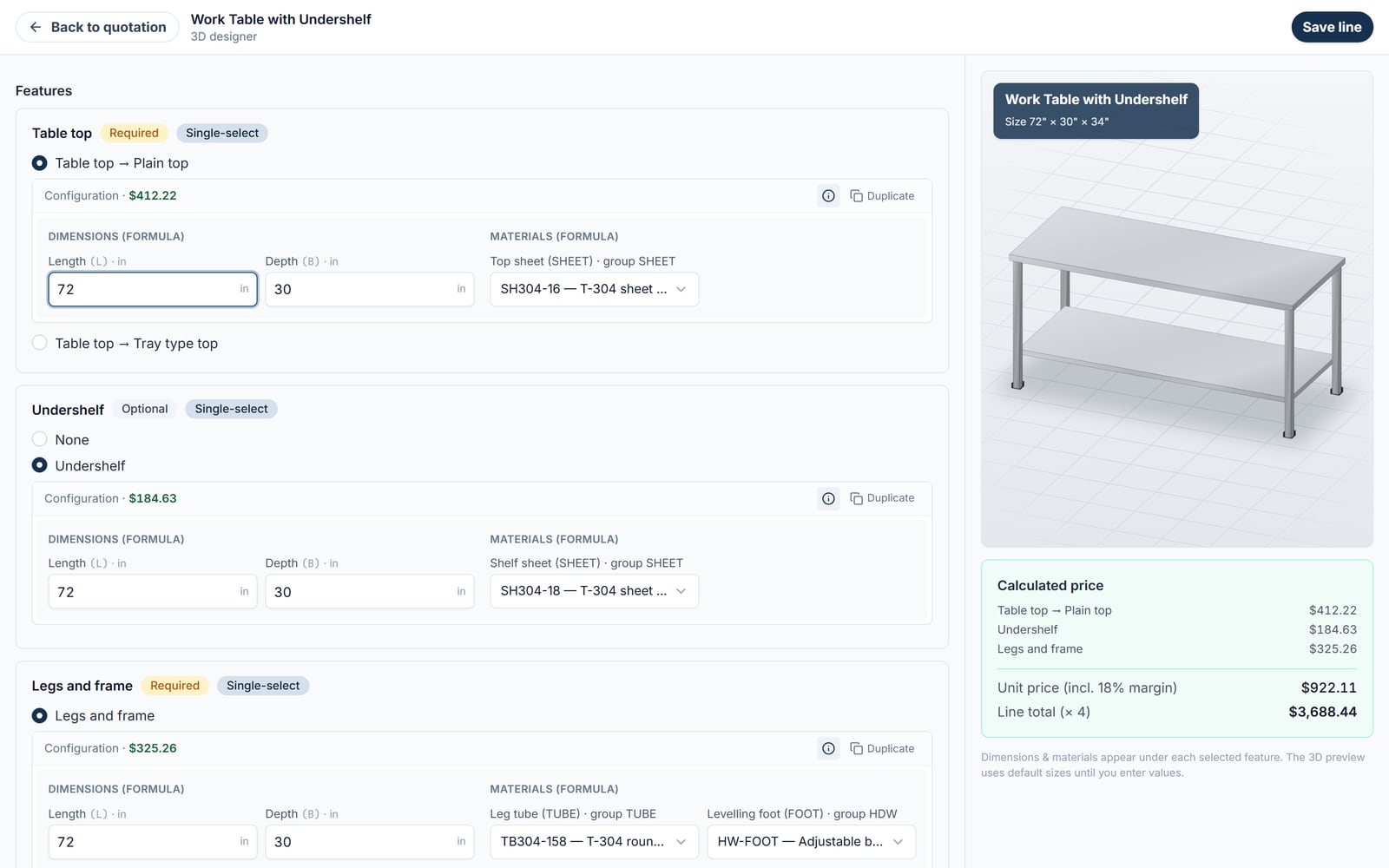
A work table has a top, an undershelf and a frame; the top may be plain or tray type. Features can be mandatory or optional, single-choice or multiple.
A formula is mapped to a product type, a feature, optionally a variant and optionally a grade — so the same table can price differently in 202 and 316 without duplicating the product.
Vendors, material grades, material groups, items with gauge, unit, rate and conversion factor, and separate labour and service rates with their own effective dates.
A readiness view per product type — not started, partial, ready — that names the missing formula mappings, so gaps are found before a quotation hits them rather than after.
Chosen per quotation. Dimensions are stored one way and converted only at the boundary, so switching units cannot quietly change a price.
The quotation
The wizard collects the client, the grade and the items, then the engine prices them. What comes out is a document a customer can act on.
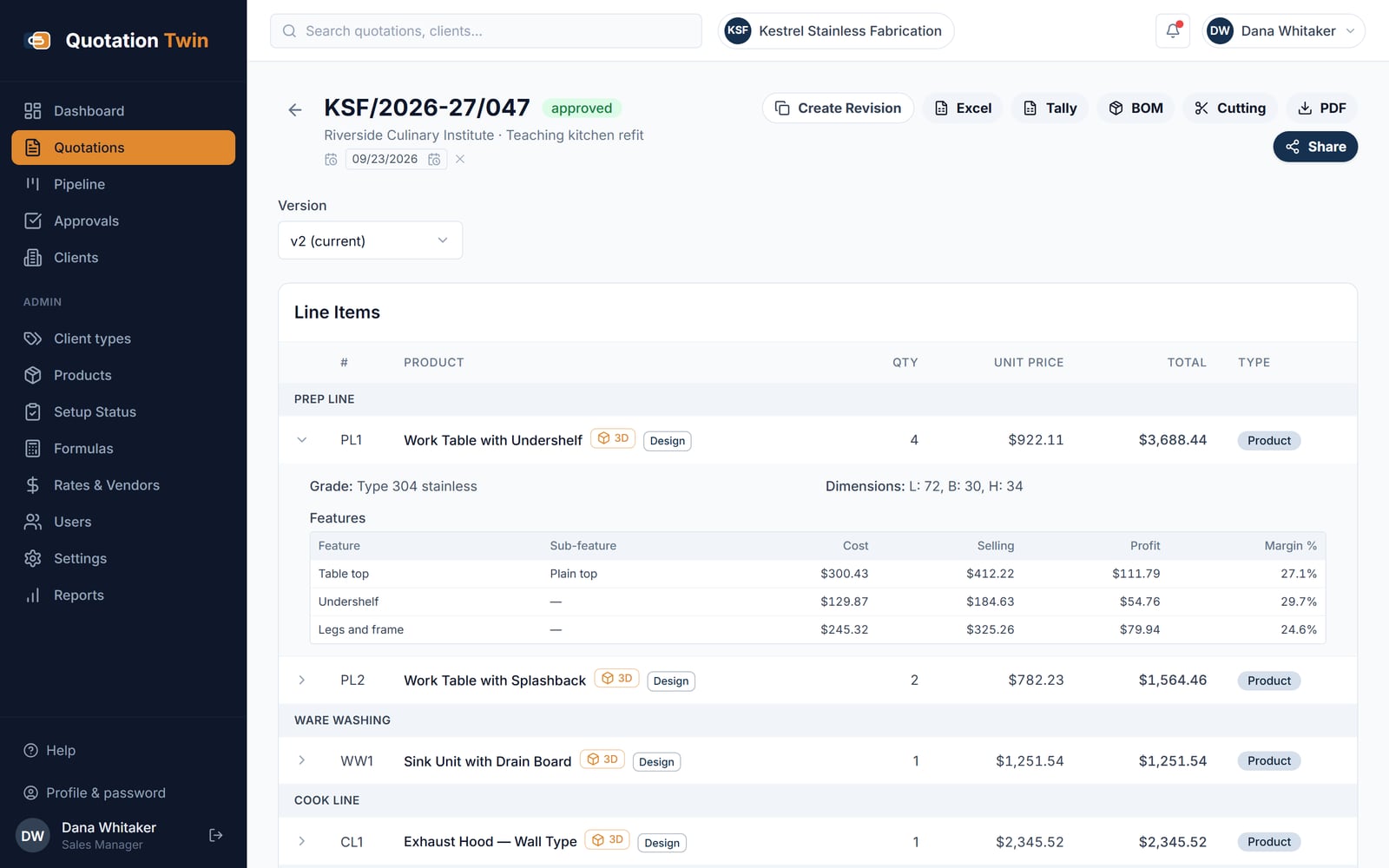
Catalogue products and free-text lines live in the same list and reorder together, so freight, a bought-in item and a fabricated one sit where they belong rather than in separate blocks.
Clone a line with its features, dimensions, materials and price, then change the one thing that differs. Six tables at five sizes is six edits, not six rebuilds.
Group a long quotation into sections — preparation area, wash area, hot range — with your own key against each line, carried through to the PDF and the spreadsheet export.
Transport, installation and commissioning are entered on the quotation and fall inside the taxable amount, which is where they belong and where a spreadsheet usually puts them by accident.
CGST and SGST or IGST at your rates; discount as a percentage or a fixed amount; and a margin per client type, so a builder and a direct customer are priced differently without anybody remembering to do it.
An information icon on each configuration shows the formula that priced it, with its steps. It can be switched off company-wide if you would rather your team did not see it.
What the customer gets
The same quotation goes out as a document and as a page, both on your branding.
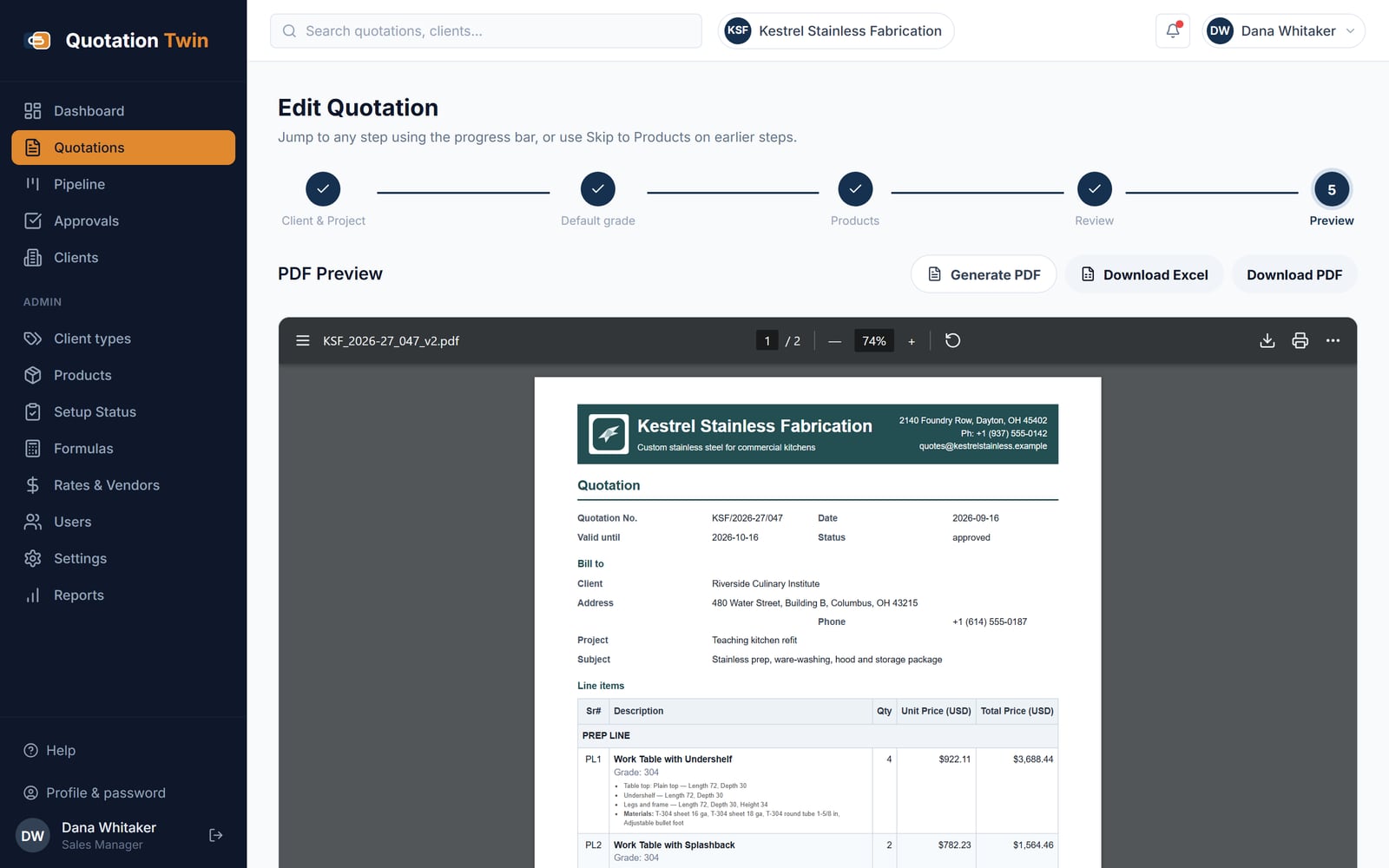
Your logo, stamp, signature, header and footer, and a terms template you keep as a named block rather than retyping.
The same quotation as an Excel file, for the customer who wants to work through it column by column.
A public link that opens the quotation in any browser — no login, no app. Enabled per quotation and revocable, so a link sent last year is not still live.
A to-scale parametric preview of the piece, updating with the dimensions, on the quotation and on the shared link. The customer sees what they are buying rather than a line of text.
The shop floor
The priced quotation already knows what the job consumes, so it produces the paperwork the shop needs instead of somebody rebuilding it from the drawing.
Material consumption aggregated across every line of the quotation, by item, with cost — as a screen and as a spreadsheet. It reports cost rather than physical quantity, which is a limitation of how quantities are recovered from a formula.
Sheet pieces derived from the job’s dimensions, laid onto standard sheet sizes by a first-fit algorithm, with a sheet count. On the demonstration quotation that is nineteen sheets for a five-line kitchen.
An approved quotation exported in a form Tally will take, so the accounts side is not re-keyed.
Control
A quotation is a document with a history, and different people are allowed to do different things to it.
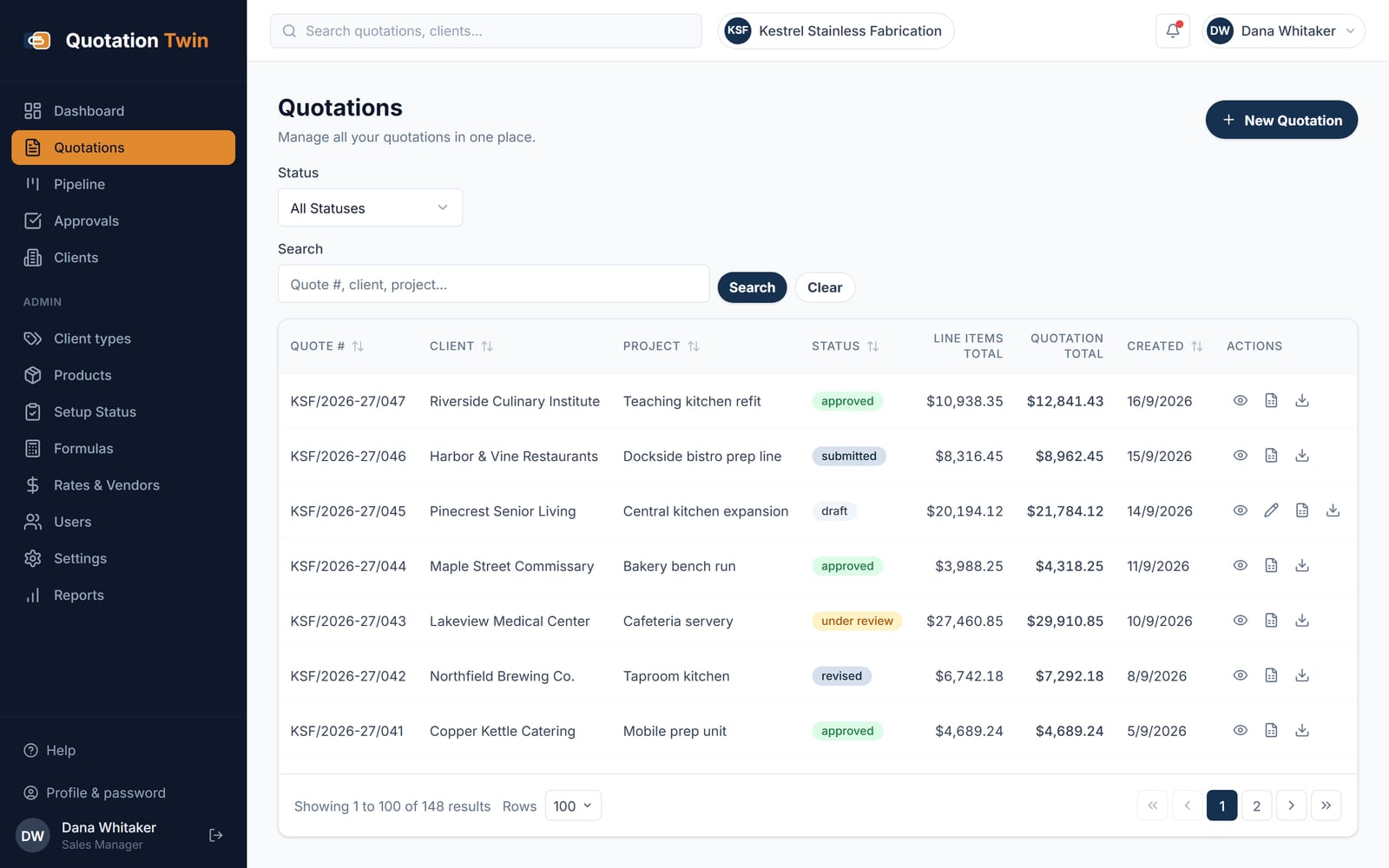
A revision copies the lines into a new version with its own number, so what was sent in March is still what was sent in March.
Submit, review, approve and reject with remarks and a full status log — or switch the whole workflow off if your shop does not work that way.
Around seventy individual permissions across sixteen modules. Sales cannot edit formulas; a viewer can report without changing anything.
Clients with contacts, GST number and type, and a pipeline view of where every quotation stands.
Every record carries the company it belongs to and every query is filtered by it. Login takes a company code as well as a username.
The engine does not care what the thing is, only that its price is calculated from its size, its material and its options.
Tables, sinks, hoods and cold rooms priced from stainless grade, gauge and finished size.
Sheet and section work where weight, cutting and welding hours drive the number.
Joinery and site items quoted per run, per panel and per finish rather than from a list.
The workflow these features sit inside is set out in how it works, the terms they use are defined in the glossary, and what it costs is on the pricing page.
Only if that product has been described as a product type with features, and a formula has been mapped to each of them. A genuinely new product is a catalogue entry plus its formulas — usually an hour of work — after which every size and grade of it prices itself. One-off items that do not justify that are added as free-text lines on the quotation.
Cost. Consumption is aggregated across every line of the quotation by item and reported in money, because quantities are recovered from the formula rather than declared by it. The cutting list is where physical output lives: it gives the flat pieces, their sizes, and the number of standard sheets they nest onto.
Yes, through an information icon on each configured line that opens the formula and its step-by-step working. It is a company-wide setting, so a business that does not want its sales team reading its costing can switch the trace off while keeping it for the people who maintain the formulas.
The grade is chosen for the quotation, and formula mappings can be grade-specific, so the same product prices differently in 202, 304 or 316 without being duplicated in the catalogue. A job that genuinely mixes grades across items is handled by mapping the material slot on the differing lines rather than by splitting the quotation.
No. Expressions are parsed and checked against a whitelist of arithmetic operators and declared variables before they are evaluated, with no function calls, no attribute access and no code execution available. A formula can add, subtract, multiply and divide over your dimensions and rates, and nothing else.
The pricing formula, out of the spreadsheet and under control. Tell us how it runs where you are — what is kept by hand, what arrives late, and what it costs when it goes wrong — and we will answer against your own figures rather than against the features page you have just read.
Your enquiry is with the team. We read every one ourselves and normally reply within one working day.
If it is quicker to talk, reach us directly:
While you wait — the platform overview covers what each application does, and Insights is our writing on building this kind of software.
Would rather read than write? See the screens — real captured ones, no sign-in.