
From an enquiry to the shop floor, without retyping anything
Setting up takes a day or so and is done with you. After that a quotation is minutes, and it is the same minutes whoever is at the desk.
-
Put your rates in once
Material grades (202, 304, 316 and anything else you stock), material groups, and the items themselves — each with its gauge, its unit, its rate and the conversion factor that turns a size into a weight. Labour and services go in the same way, under short codes your formulas refer to. This is the master a rate change edits, once, for every quotation afterwards.
A sheet is held as rupees per kilogram plus kilograms per square inch at that gauge, because that is how it is bought and how it is consumed. The formula multiplies an area by one and then the other, and the two halves never get confused.
-
Describe your catalogue
A product type is the thing you sell — a work table, a sink unit, a wall hood. Its features are the parts that carry cost: the top, the undershelf, the frame, the splashback. A feature can have variants, like a plain top against a tray type top, and can be mandatory or optional.
This is deliberately not a parts catalogue. You are describing the shape of the job, not listing every size you have ever made, because the sizes come from the quotation.
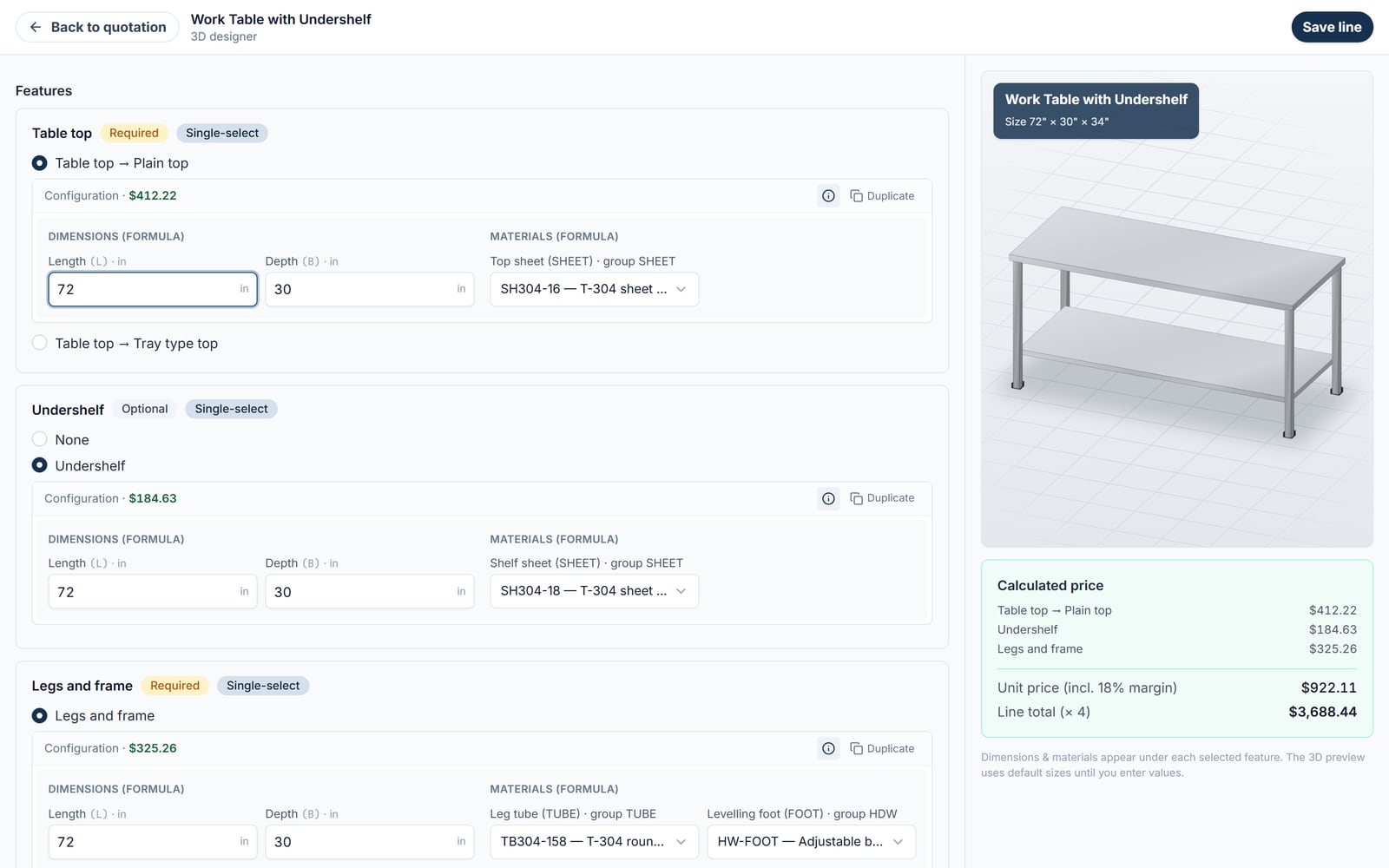
Dimensions and materials entered per feature; the 3D model and the price are built from the same values -
Write the formula for each feature
A formula is an ordered set of steps. Step one works out the sheet weight from the dimensions; step two turns that into money at the grade rate; step three adds fabrication labour per square foot; step four adds consumables and returns the total. Test it in the editor with sample dimensions and read the trace before it goes anywhere near a customer.
Formulas are set up with you during onboarding. This is the part that carries your trade knowledge, and it is worth getting right rather than fast.
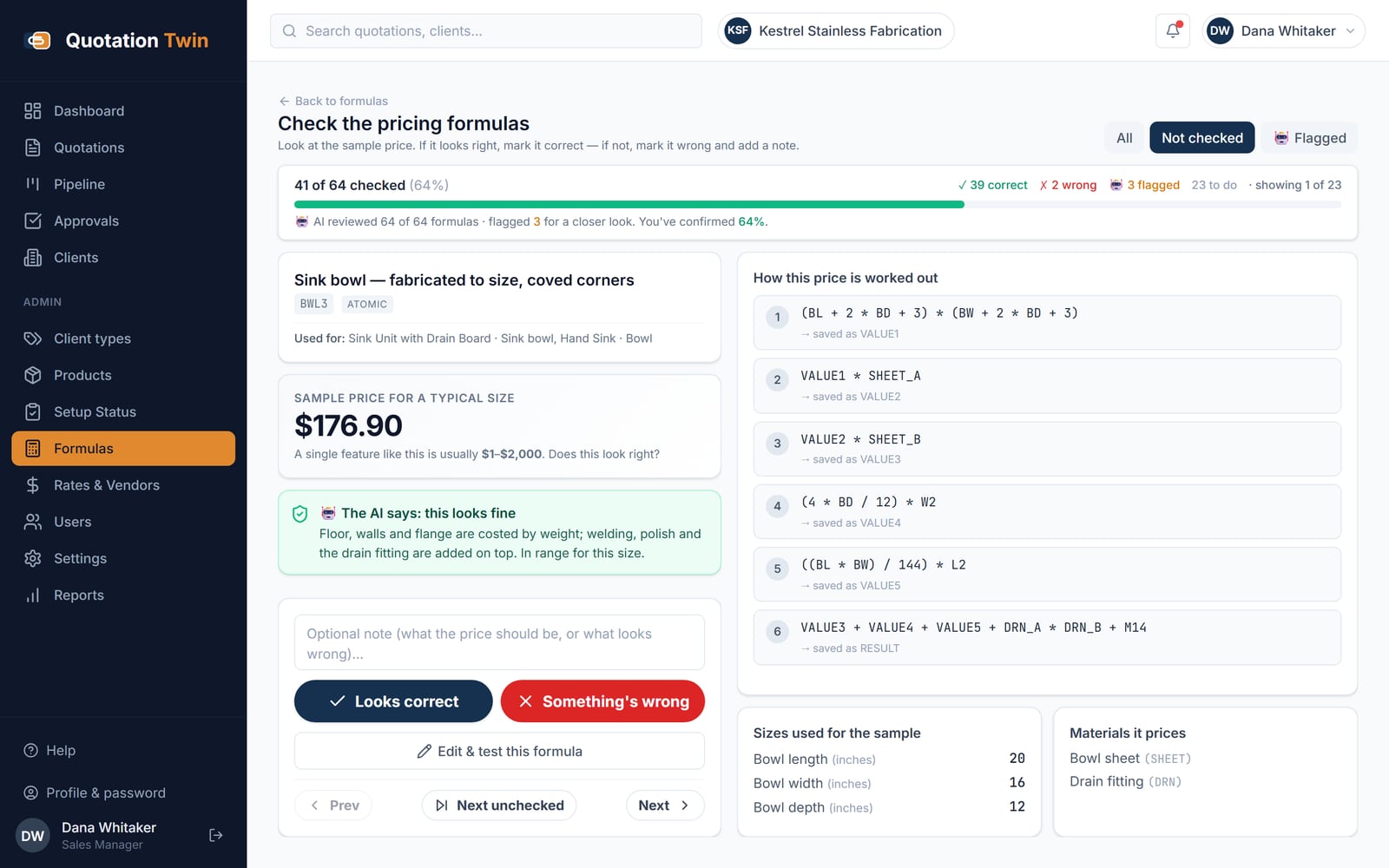
Each pricing formula is priced at a sample size, reviewed by the AI and signed off by a person -
Build the quotation
Pick the client, pick the grade for the job, then add items: product, dimensions, options, quantity. The engine resolves which formula applies to each feature, finds the right material for the grade, and prices the line. Duplicate a line to make the next size. Add free-text lines for bought-in items and freight.
Sections group a long quotation into areas of the job, and each line can carry your own key. Transport, installation and commissioning go on the quotation and fall inside the GST base rather than being added after it.
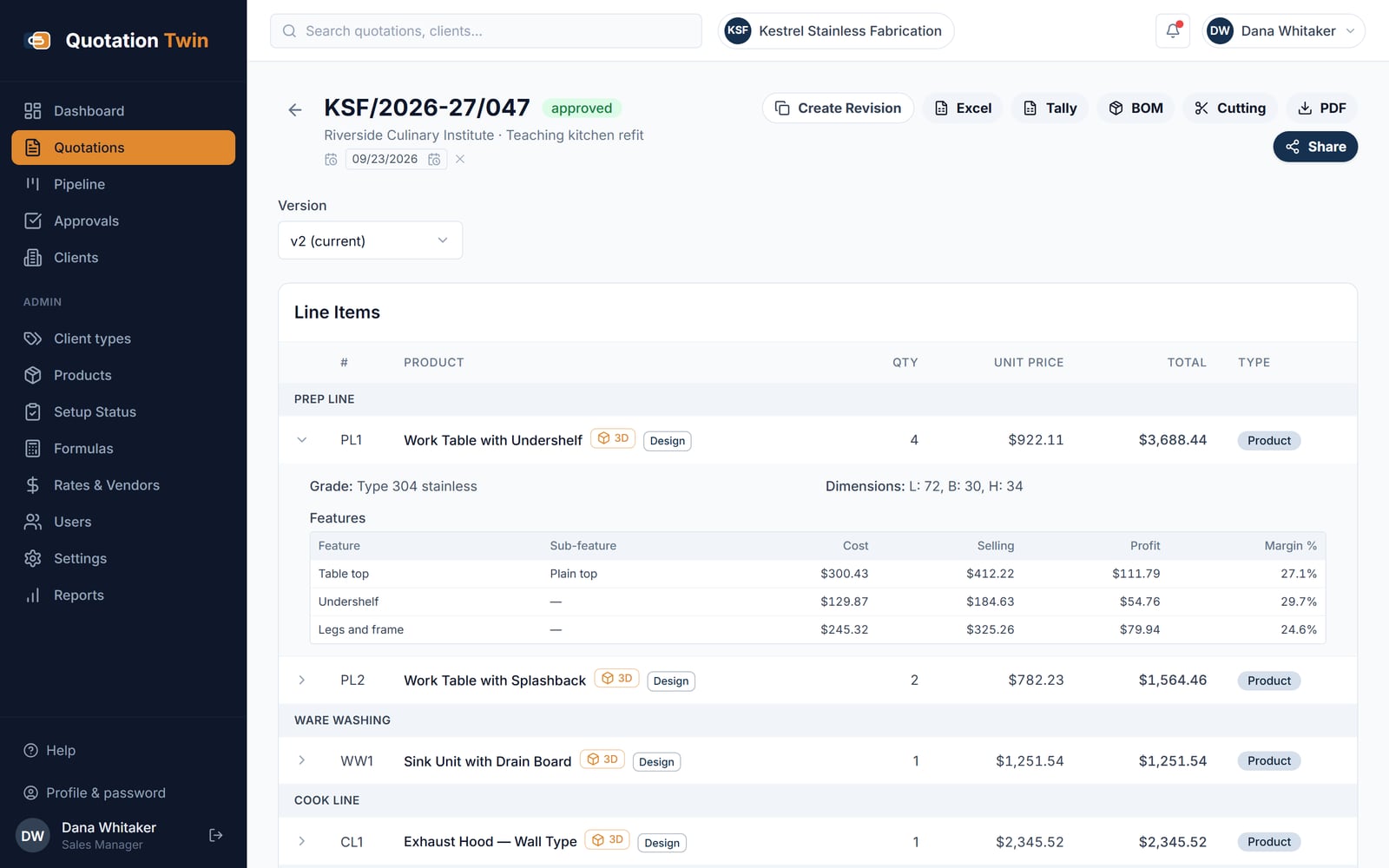
Version 2 of an approved quote, with cost, selling price and margin shown per feature -
Send it
A branded PDF on your letterhead with your terms, a spreadsheet export if the customer wants to work through the numbers, and a shareable link that opens the quotation in any browser with a to-scale 3D preview of the piece. The link is enabled per quotation and can be revoked.
If your shop works with approvals, the quotation goes through submit, review and approve with remarks and a full status log first. If it does not, that workflow can be switched off.
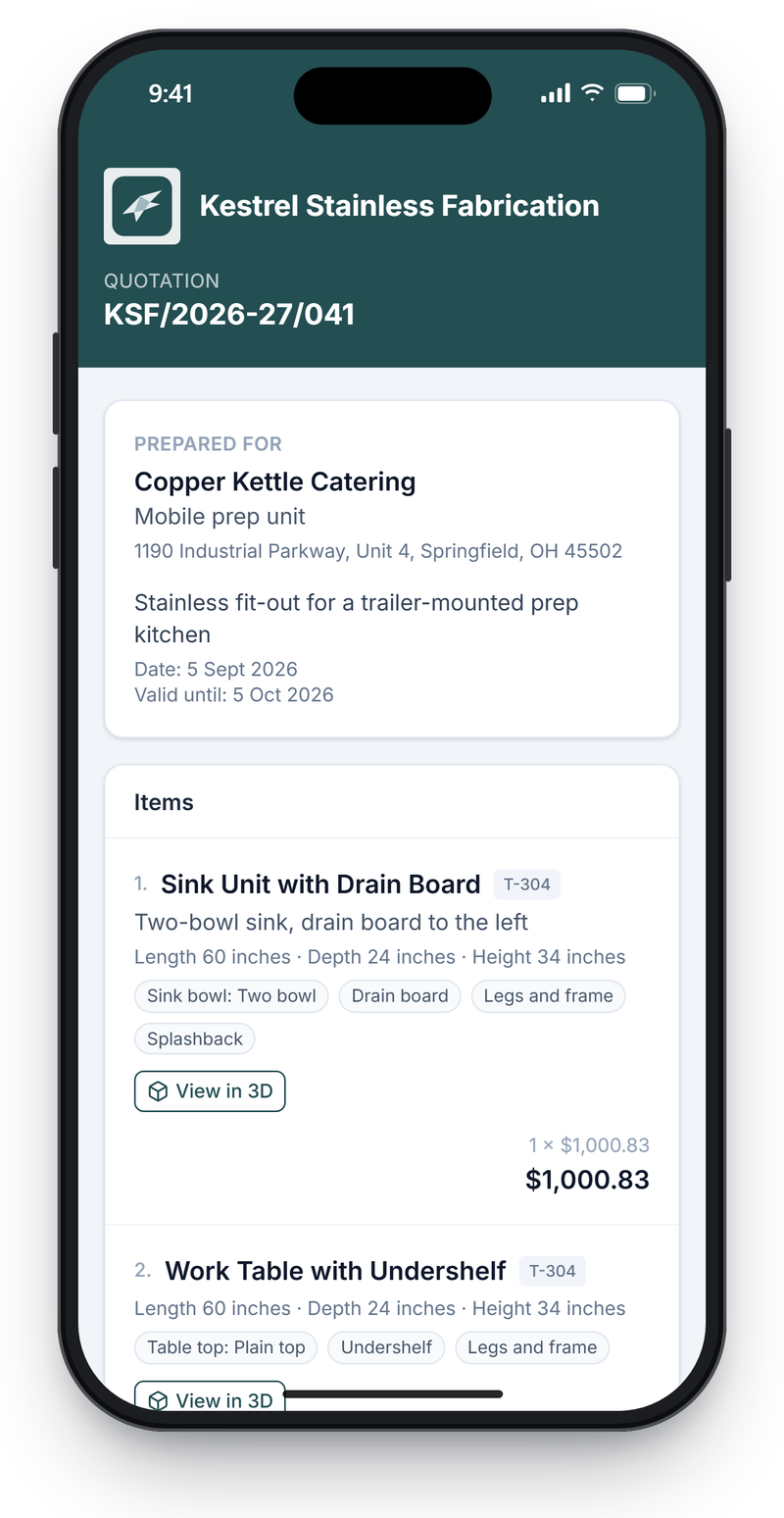
The customer opens the quote link on a phone, with no account or login -
Hand it to the shop
The same priced quotation produces a bill of materials — what the job consumes, aggregated across every line — and a cutting list that nests the sheet pieces onto standard sheets and counts them. An approved quotation can be exported to Tally.
Nothing is retyped between the customer’s number and the shop’s, which is the usual place for the two to quietly disagree.
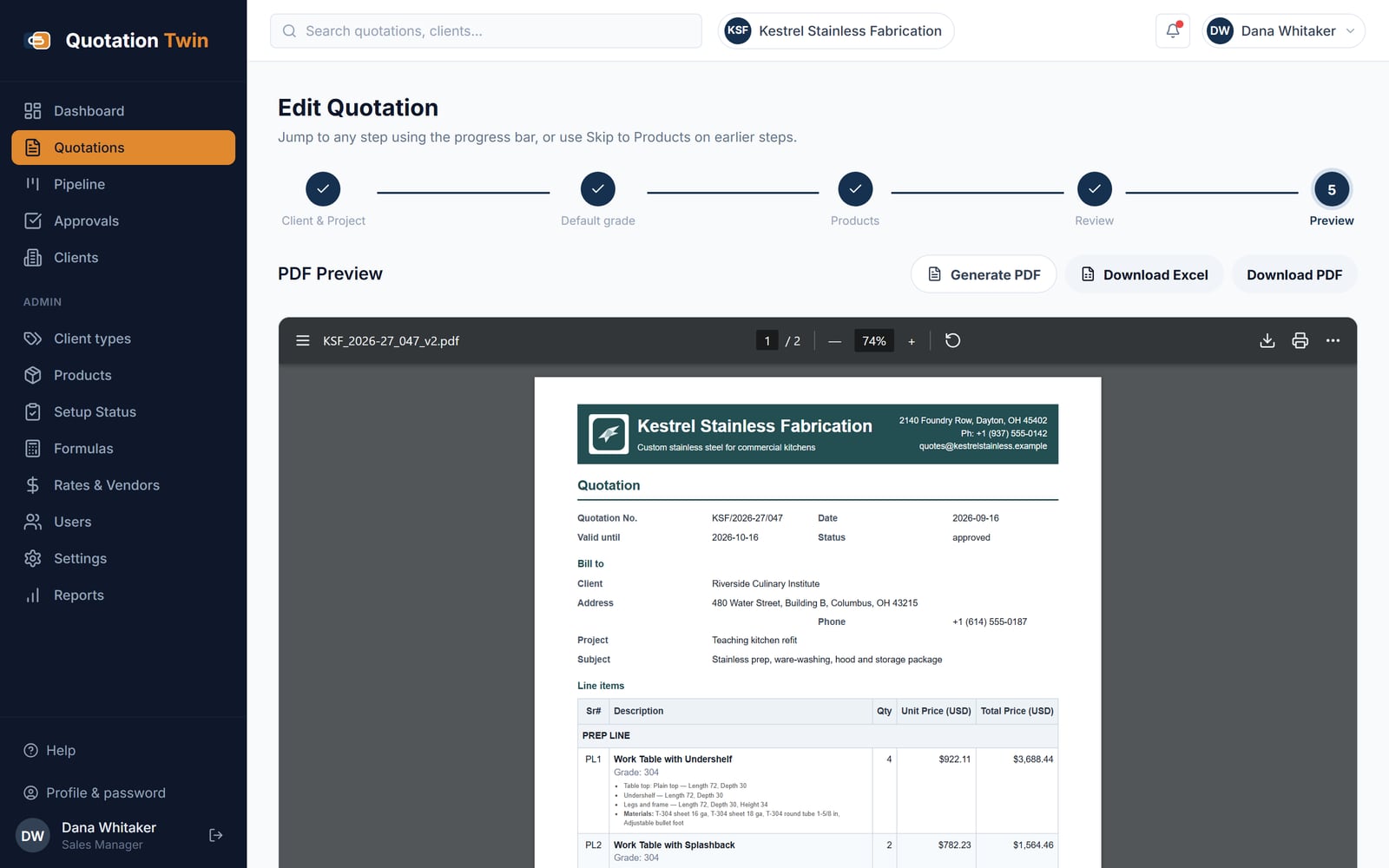
The PDF is generated from the quote record in the fabricator's own colours and logo
What setting up actually involves
The honest answer, because it is the question that decides whether this is worth your time.
- Your rates — A spreadsheet of what you buy and what you pay for labour. This is the part you already have, and it goes in as it stands.
- Your products — The four or five things you actually sell most of, described as features. You do not need the whole catalogue on day one.
- Your formulas — The arithmetic currently living in a spreadsheet, in somebody’s head, or both. This is done with you, and it is where the time goes.
- Your branding and terms — Logo, stamp, signature, and the terms block you put at the bottom of every quotation today.
Bulk import covers the masters — vendors, grades, groups, material and service items, clients. Formulas and their mappings are not bulk-importable and are set up directly.
Bring a quotation you have already sent
We will build the same job here and price it
If the number does not match what you quoted, that is worth knowing either way. The workflow above is the same one whether you fabricate for commercial kitchens, metal fabrication or interior fit-out.
Frequently asked questions
How long does setting up actually take?
A day or so of working sessions for a shop that already knows its rates. The masters go in quickly because they are bulk-imported from the spreadsheets you have — vendors, grades, groups, material and service items, clients. The time goes on the formulas, which are written with you rather than handed over as a task.
Do we have to load the whole catalogue before we can quote?
No. Describe the four or five product types you sell most of and quote those; anything else goes on the quotation as a free-text line in the meantime. A setup status view per product type shows which formula mappings are missing, so the catalogue is filled in deliberately rather than discovered to be incomplete mid-quotation.
What happens when a material rate changes?
You edit the item in the rate master once. Formulas refer to materials and labour by code and resolve them at the moment a line is priced, so every quotation built afterwards uses the new rate. Quotations already sent keep the numbers they were sent with, because a version is a record of what went out.
Can our existing data be imported rather than typed in?
The masters can: vendors, material grades, material groups, material and service items, and clients are all bulk-imported. Formulas and their mappings to products, features, variants and grades are not bulk-importable and are set up directly, because that is the part that has to be tested rather than loaded.
Ready to see Quote on your own numbers?
The pricing formula, out of the spreadsheet and under control. Tell us how it runs where you are — what is kept by hand, what arrives late, and what it costs when it goes wrong — and we will answer against your own figures rather than against the how it works page you have just read.
Thank you — that has reached us
Your enquiry is with the team. We read every one ourselves and normally reply within one working day.
If it is quicker to talk, reach us directly:
While you wait — the platform overview covers what each application does, and Insights is our writing on building this kind of software.
Would rather read than write? See the screens — real captured ones, no sign-in.