Let's talk

Sazinga Sarva · Operations

Rental Management Software

Bookings, availability and the fleet standing behind them

Rental operators running a fleet of vehicles or equipment through direct and partner bookings

In production — Four installations across the Gulf, the USA and Africa, and extensible to equipment rental on the same booking model (September 2026).

The Rentals operations board on a laptop — every open booking grouped by the step it is waiting on, with late and same-day work flagged — beside the handoff screen on a phone, recording the amount collected, the odometer and fuel reading and the vehicle photographs
The portal and the driver app. Every booking grouped by what it is waiting on for the office; the handover recorded at the car, photographs and all, for the driver. Both are real captured screens. The devices around them are drawn, not photographed. Everything on the handoff screen is saved on the phone first and uploads once the driver completes the handover. A real captured Rentals screen, on a demonstration tenant's data, composited into a generated photograph.

Rentals in use

Every screen below is rebuilt from Rentals's own interface and filled with a demonstration tenant's data. They are not captures of a live customer system.

Tap any picture to open it full size.

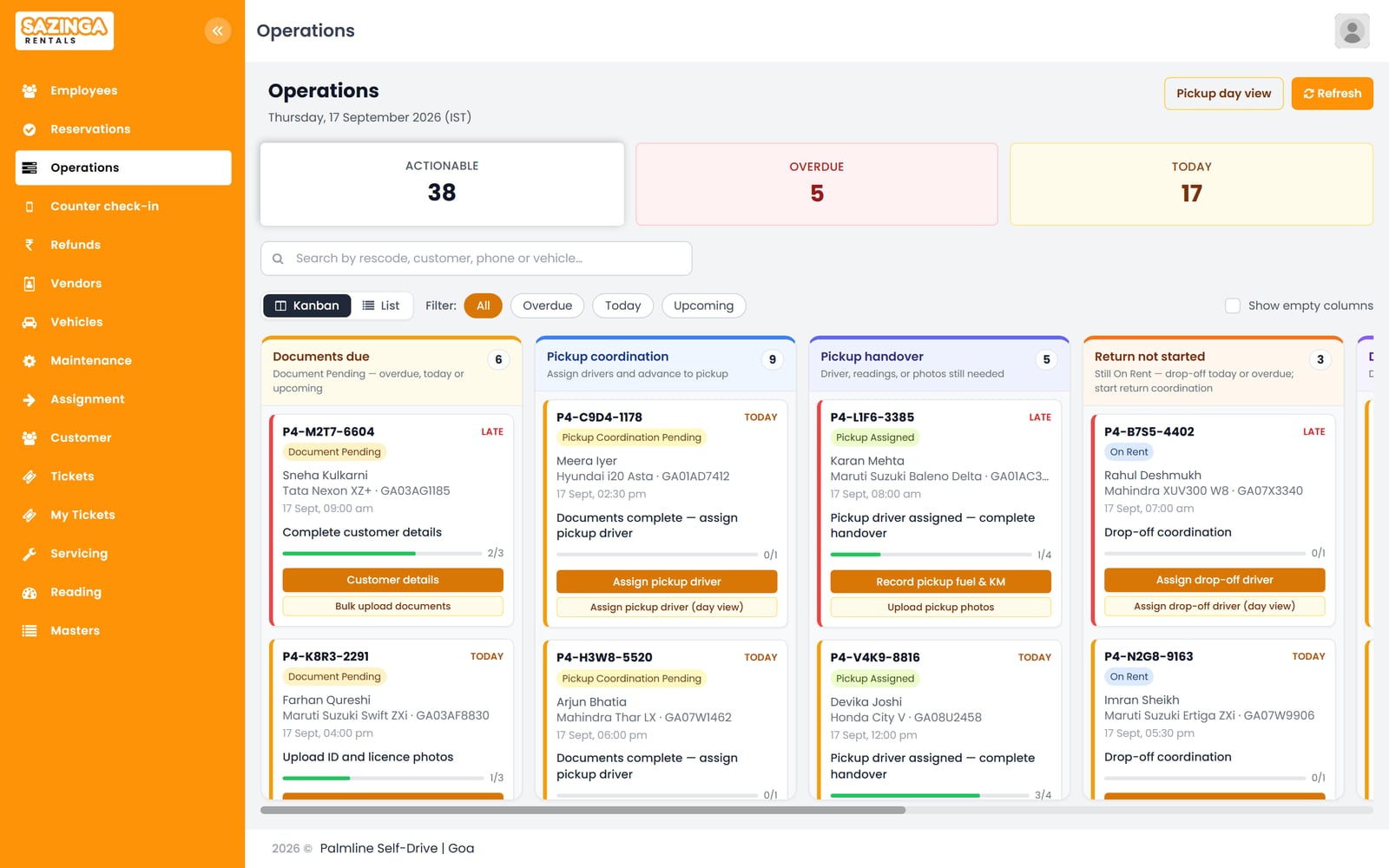
Sazinga Rentals operations board with booking cards in columns for documents due, pickup coordination, pickup handover and returns not started
The operations board groups every open booking by the step it is waiting on. Each card shows how far through that step it is, flags late and same-day work, and names the next action.
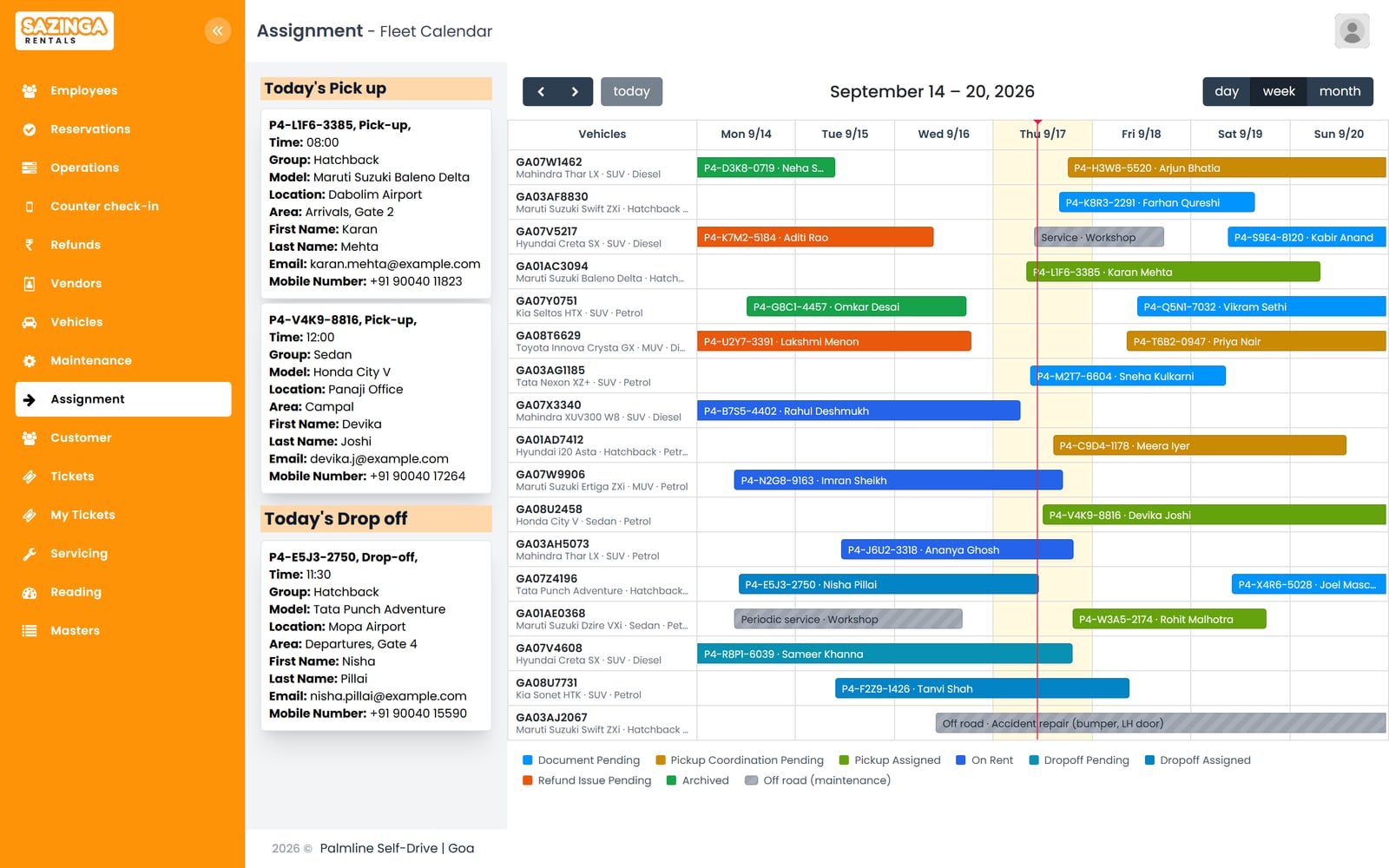
Week view of the fleet calendar with one row per vehicle, coloured booking bars and hatched blocks for vehicles in the workshop
Fleet calendar for the week, one row per vehicle. Bookings are coloured by status, and a vehicle in the workshop shows a hatched block for the days it cannot be hired. Today's pick-ups and drop-offs are listed on the left. The week timeline with one row per vehicle, the status-coloured bars, the maintenance blocks and the legend are invented; the app's calendar has a driver day view only.
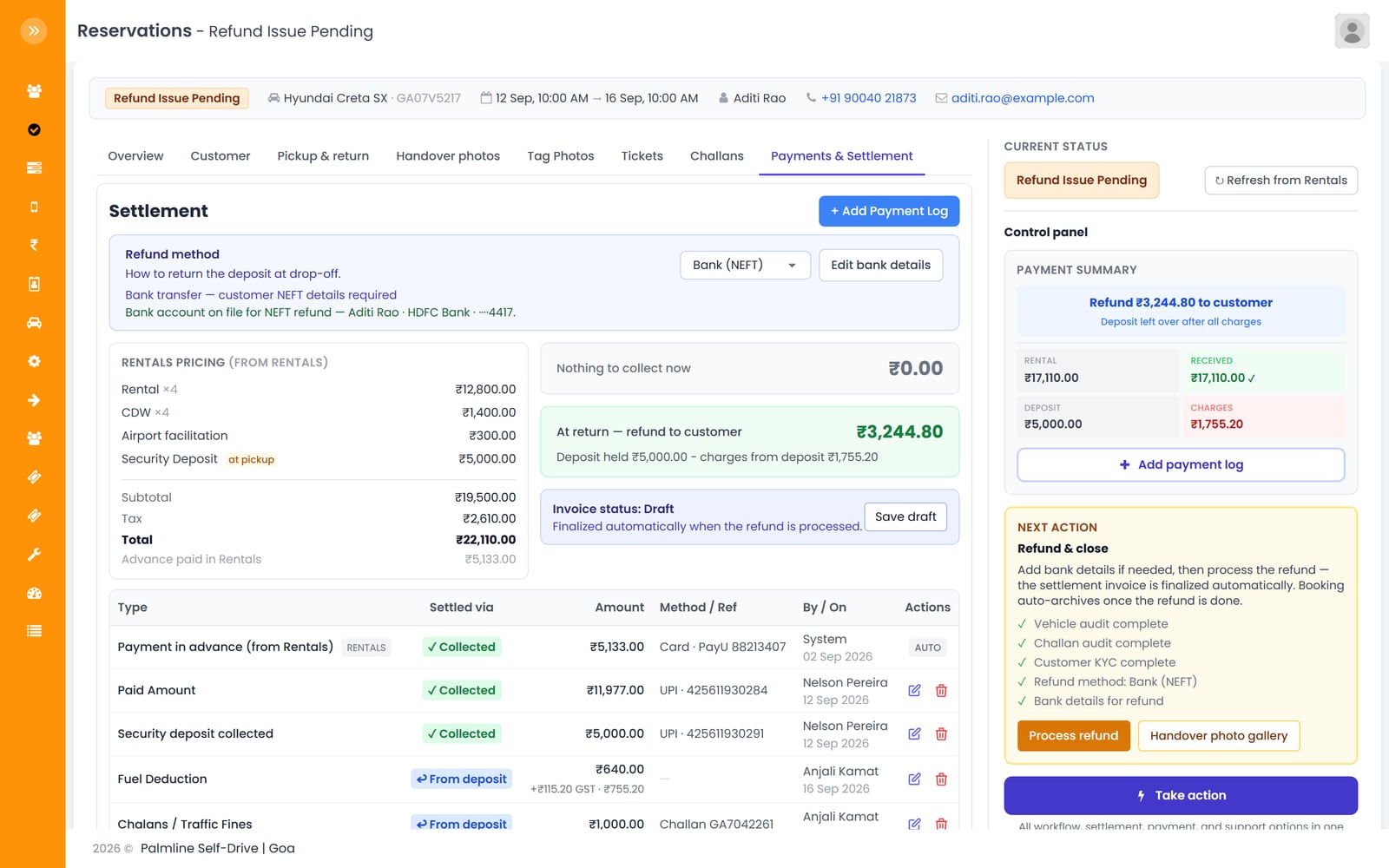
Reservation payments and settlement tab showing rental pricing, a deposit refund of 3,244.80 rupees and the ledger entries behind it
Settlement for a returned booking. The ₹5,000 deposit, less a fuel deduction with GST and a traffic challan, leaves ₹3,244.80 to refund by NEFT. The control panel lists the audits and bank details that must be done before the refund is processed.
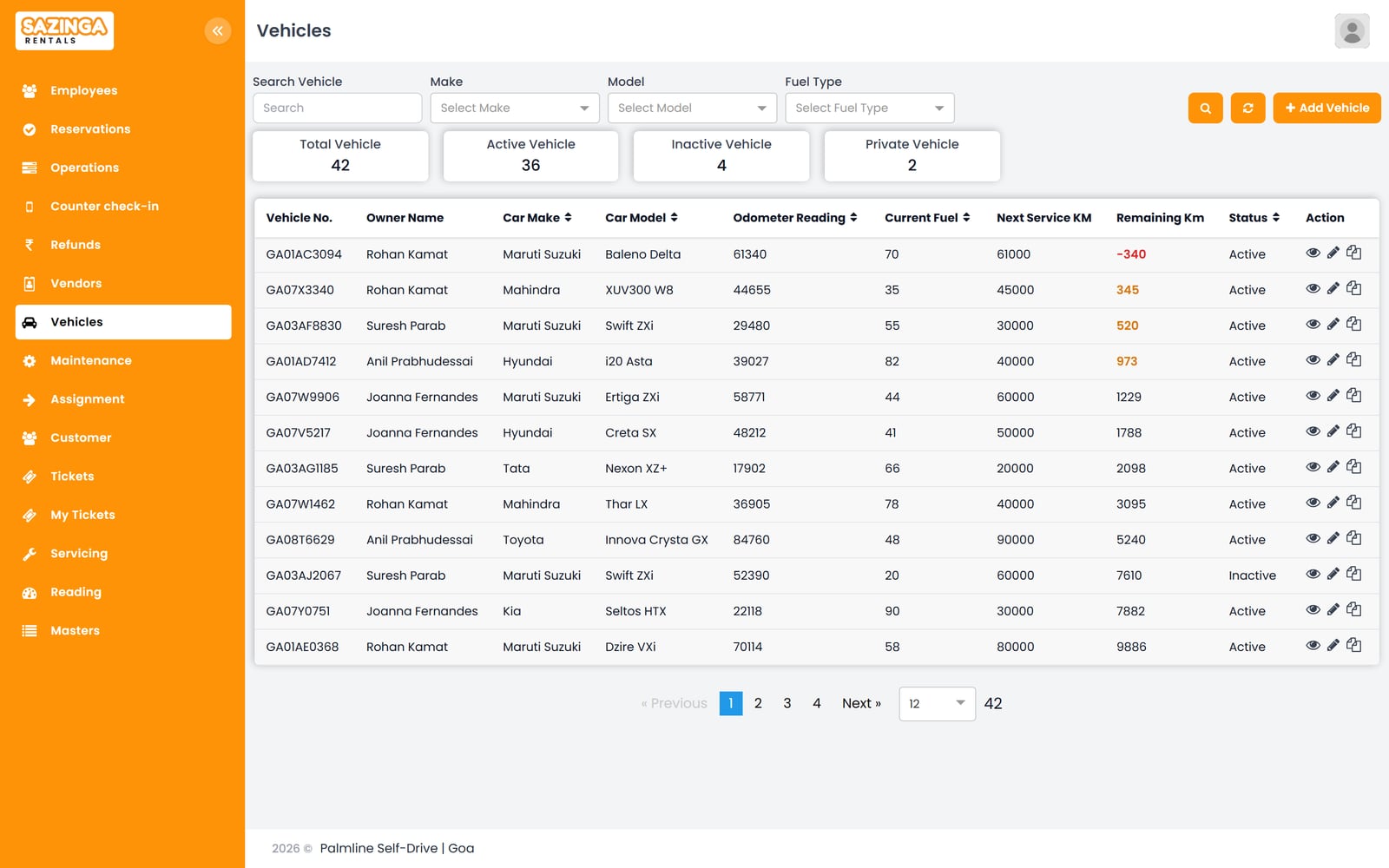
Vehicle list with owner, odometer reading, fuel level, next service kilometre and remaining kilometres for each car
Vehicle list with odometer and fuel from the last handover. The next service falls due at a kilometre reading, not a date, so the remaining distance is worked out from the current reading. Overdue and near-due vehicles are highlighted. The Next Service KM and Remaining Km columns and the overdue and near-due highlighting are additions; the app holds those figures on the vehicle's Service and Usage card, not on the list.
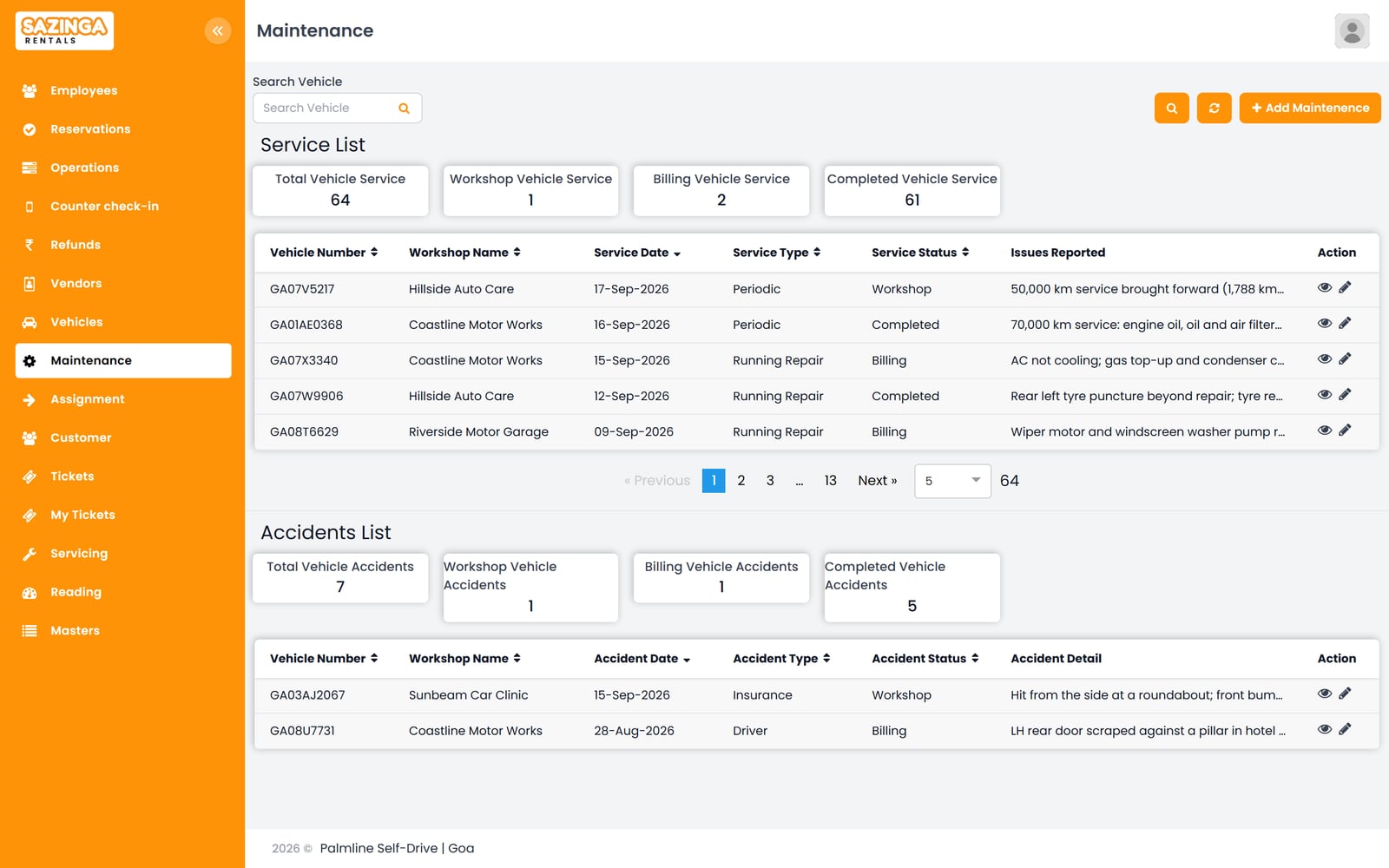
Maintenance page with a service list and an accident list, each with workshop, date, type, status and reported issue
Services and accident repairs, each tracked from workshop to billing to completed. The service brought forward for GA07V5217 is the same off-road block shown on the fleet calendar.
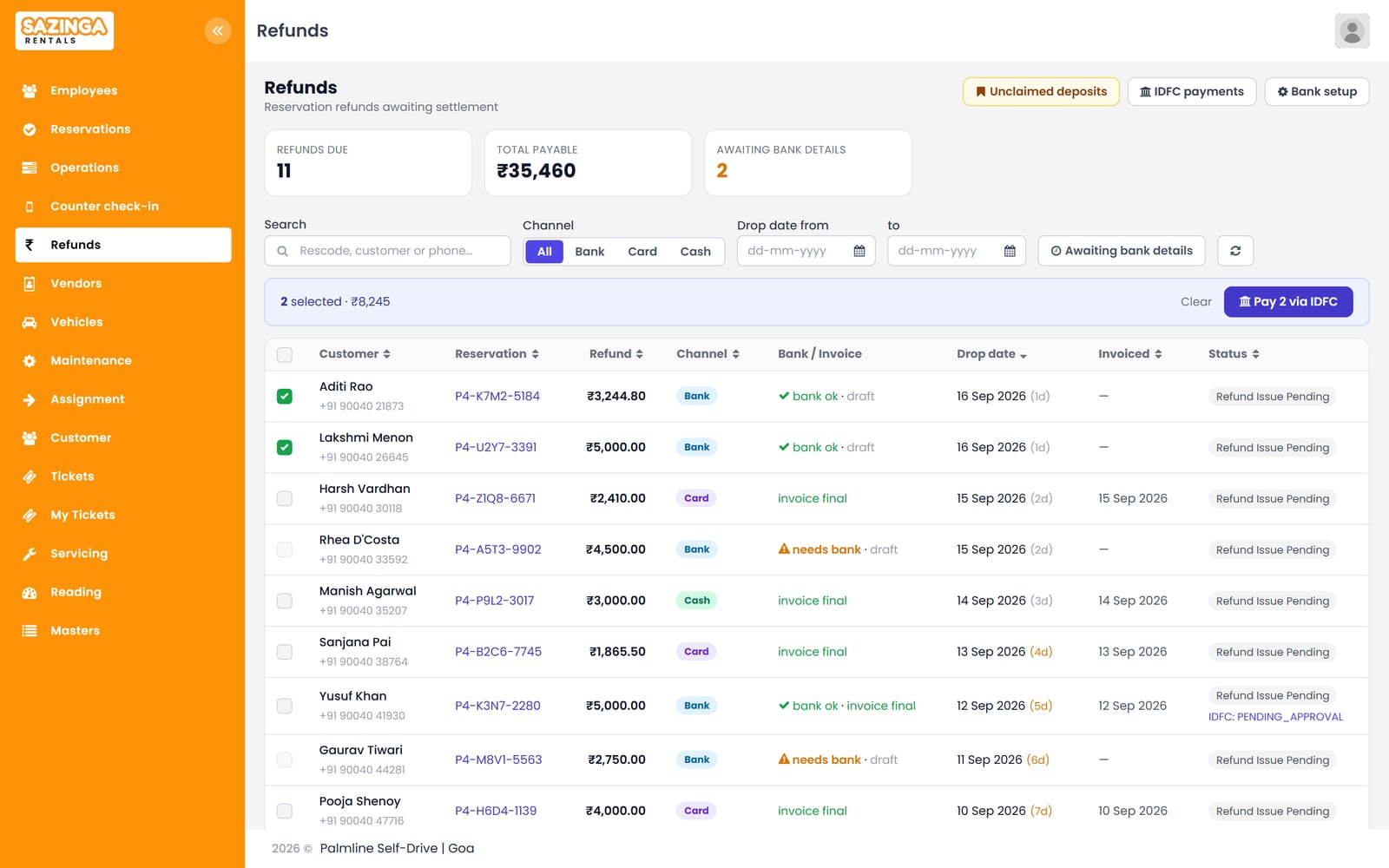
Refunds list showing deposits due back to customers with refund channel, bank details status, invoice status and bank payout status
Deposit refunds due, with the channel for each, whether bank details are on file and whether the invoice is still a draft or final. Refunds ready to pay can be selected and sent to the bank in one batch.
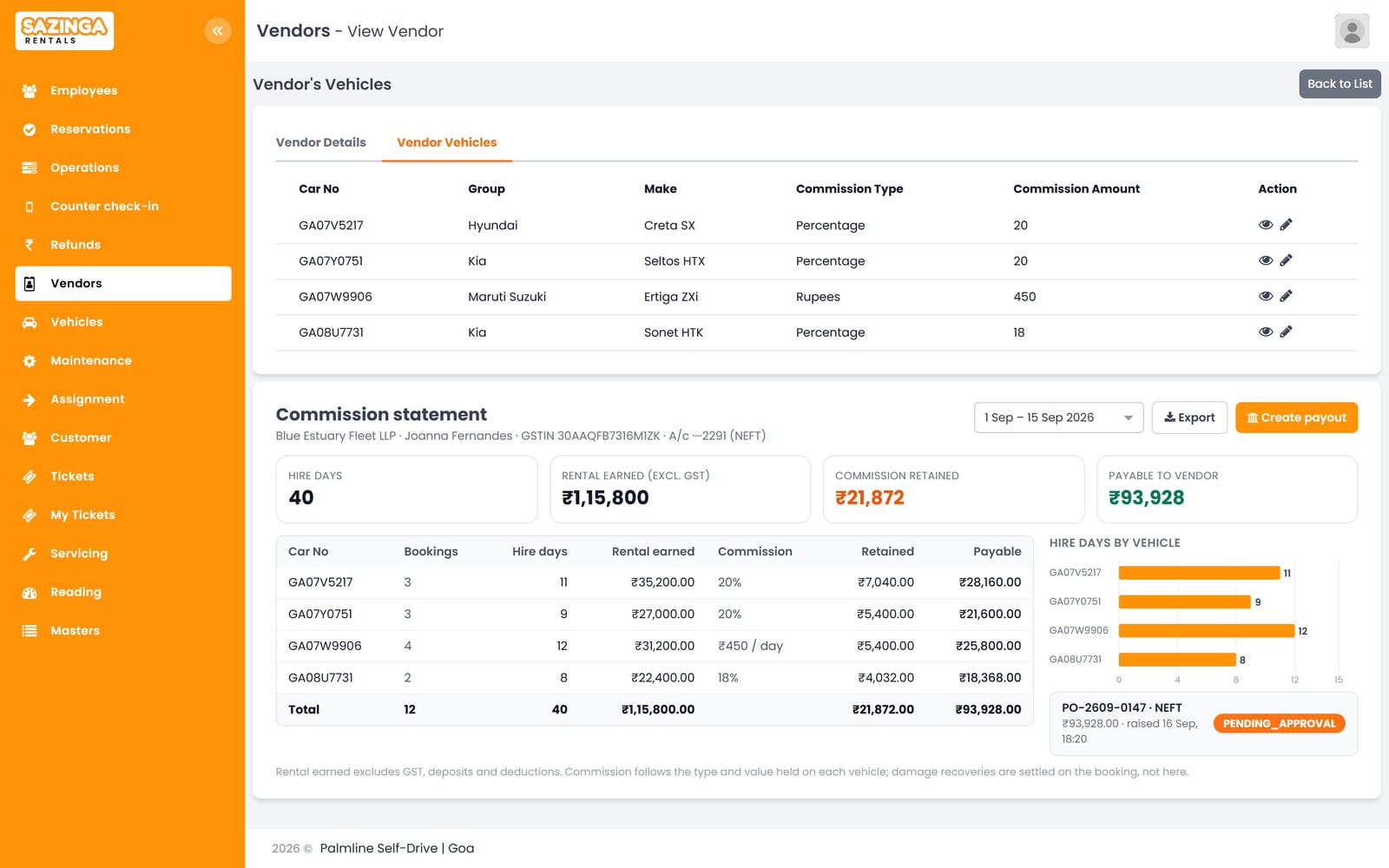
Vendor page listing the owner's vehicles with commission type and value, and a commission statement for 1 to 15 September
Vehicles supplied by an owner carry their own commission terms, either a percentage or a fixed amount per hire day. The statement applies those terms to the fortnight's hire days to give the amount payable, and shows the bank payout raised for it. The commission statement card is invented; the portal holds commission terms per vehicle and has a payout module, but no screen that combines them per vendor and period.

You get something made from your own material, within one working day, and no call unless you ask for one.

Send one week's booking sheet

A photo or a spreadsheet is enough. Within one working day we return it as a live availability board, and what the driver would see on his phone at each handover.

One file, up to 10 MB. Nothing you send is shared or kept beyond answering you.

A person reads every enquiry and replies within one working day.

Would rather read than write? See the screens above, or the whole platform — seven applications, each one standing on its own.

Related work

Case studies

Rental operators lose money in the gaps. Availability sits in a diary that only one person keeps, a vehicle is promised to a second customer while it is still out, a service falls due in the middle of a confirmed hire, and partner commission is worked out from memory at the end of the month.

Sazinga Rentals covers the part of the business that starts once a booking exists and does not end when the vehicle comes back: the handover, the condition it went out and came back in, the deposit, the deductions against it, the fine that arrives three weeks later, and the refund that finally closes the file.

What this replaces

A WhatsApp group for handovers, a folder of photographs nobody can find later, a spreadsheet of deposits held, and an argument at the counter about a scratch. The last of those is the expensive one, and it is almost always a records problem rather than a disagreement about the facts.

Why a booking’s status is computed rather than typed

A rental moves through a defined sequence: documents pending, pickup coordination, pickup assigned, on rent, dropoff pending, dropoff assigned, return pending, returned, and then the refund states that close it — with cancelled and expired as the other endings. Twelve states, with the moves between them defined rather than left open, so a booking cannot jump from documents pending straight to returned because somebody picked the wrong item from a list.

More usefully, most of those states are derived from facts rather than set by hand. Whether a booking is on rent is a consequence of the pickup leg having been handed over; whether it is returned is a consequence of the dropoff handover and the closing odometer reading existing. A status column that people are asked to maintain is a status column that goes stale — so the terminal and money-related states are protected, and the rest are recomputed from the records underneath them.

What a handover actually records

Each leg of a hire — taking the vehicle out, bringing it back — is its own assignment to a person, moving from assigned to handed over. That is what makes “who gave this car to the customer, and when” answerable months later.

Against each leg sit the photographs, and they are typed rather than dumped: exterior views, a checklist capture, and any photograph flagged as showing damage. A damage photograph carries a description and the fee attached to it, and can carry annotations marking where on the vehicle the damage is. Odometer readings are captured at pickup and at dropoff, fuel level is held against the tank’s capacity rather than as a vague fraction, and both feed the deductions later.

How the deposit gets settled

Money on a hire is a ledger, not a running total that somebody adjusts.

Every amount is an entry with a type, a direction, and a bucket that says what kind of money it is — the rental itself, an administrative charge, the security deposit, an ad-hoc deduction, or tax. Each type declares whether it is taxable, which is how the rental amount can carry its tax from the booking engine while a fuel deduction or an additional-kilometre charge is taxed here, without anything being taxed twice.

Settlement is then arithmetic over those entries rather than a negotiation. A deposit is held as an entry, deductions are entries against it, and what is returnable falls out. The original booking total is pinned in an immutable snapshot taken at the first sync, so a later re-price upstream cannot quietly move the number the settlement was calculated from.

The refund itself is deliberately a separate record — amount, method, transaction reference, the date it was paid and a status of its own. A refund that the arithmetic says is due is not a refund that has been paid, and the system will say nothing rather than tell a customer money has been sent when only a projection exists.

What happens when a challan arrives three weeks later

A traffic challan turns up long after the vehicle has been returned and the customer has gone, and it has to be attached to a hire that is otherwise closed.

It is recorded against the reservation with the challan number, the date and place of the violation, the amount, and the notice itself as a document. The interesting part is what it does not have: there is no “reviewed” column. Whether a challan has been dealt with is derived from whether its amount has been posted to the ledger — the act of settling it is the act that marks it settled. A status field beside the ledger could only ever drift out of step with the ledger it is supposed to describe.

How documents and servicing stay current

Every document a vehicle needs — registration certificate, insurance, fitness certificate, pollution certificate, permit — is held with its type, issuer, serial number, the date it was issued and the date it expires, along with the file itself and the amount it cost. Changes to those records are logged, so a renewal is a history rather than an overwrite.

A subset can be marked shareable, for the documents a driver may need to produce at a check post. That endpoint is gated on the server rather than in the interface: only documents that are active, marked shareable, and not past their expiry date are ever returned, so a stale row still flagged as shareable cannot leak an expired certificate.

Servicing works off the odometer rather than the calendar. Each vehicle carries its service interval in kilometres and the reading at its last service, so the next service due is a calculation against the current reading — which is the number that actually determines whether a service is due.

What it does not do

It is not a consumer booking website. The customer-facing funnel, the rate display and the availability search that fills the calendar sit upstream of this; Rentals is the operations and money layer that runs from a confirmed booking onwards, and it is integrated with the booking engine rather than replacing it.

It is not an accounting package either. It produces invoices, tracks outstandings and settles deposits; it does not keep your books, and the figures are meant to be exported to whatever does.

There is no telematics: no live vehicle tracking, no fuel-sensor integration and no driver-behaviour scoring. Fuel and odometer are recorded by a human at handover, which is honest about where the number comes from.

Where to go next

The vehicle rental industry page covers the operating problems behind all of this, and the vehicle rental operator case study covers one fleet in detail. Operators who sell advertising space on the same kind of period-based calendar will find the model familiar in Sazinga AdBoard.

Rentals on a phone

Swipe for the other screens.

Driver app home screen with the driver's monthly handover counts, a banner for bookings still uploading photos and an overdue pick-up
The driver app opens on the driver's own pick-ups and drop-offs for the last 12 hours and the next 24, sorted by how urgent they are, with this month's completed handovers above them.
Driver app search results showing a drop-off booking card with timeline, customer contact buttons, amount due and vehicle
A booking card shows when the handover is due, the pick-up and drop-off times, whether the customer's documents are in, CDW cover, any amount still to collect, and the vehicle.
Driver app handoff screen with amount collected, odometer and fuel entry, a kilometre warning and nine vehicle photos
The handoff screen records the amount collected, the odometer and fuel reading, and the eight vehicle photos. It warns when kilometres per day exceed the operator's limit. Everything is saved on the phone and uploads once the driver completes the handoff.
Driver app grid of pickup photos labelled by view, the odometer tile carrying the recorded reading, and the two damage photos outlined in red
Photos from the pickup, labelled by view type, so the driver can compare the car at return. The odometer reading and fuel level are read off the record rather than off the photograph. Damage photos are outlined in red. The labels are set in the back office, where an image model suggests them for the distinctive views. The odometer and fuel chip over the photo tile is an addition, and the phone does not tag photos: the view types are set on the portal's Tag Photos tab.
Driver app damage photo with two red circles drawn around scratches, colour choices and save buttons
The driver can circle damage on a photo before saving it, so the area in question is marked on the image that goes on record.
Driver app list of handed-off bookings still uploading, with one saving details and one with photos stuck
Bookings that are handed over but still uploading. Each clears itself once its photos and details reach the server. If an upload is stuck, the driver can force a sync.

What Rentals does

Bookings and availability

Availability is calculated from live bookings rather than maintained by hand, so an asset already out on hire for a period cannot be booked again for it. Extensions and early returns update the calendar as they are recorded.

Fleet and asset records

Each vehicle or unit holds its registration, documents, purchase details, current status and hire history. What is on hire, what is idle and what is off the road is one view rather than a phone round.

Maintenance and servicing

Service schedules, repairs and document expiry are tracked per asset. An asset marked off the road for maintenance is withheld from availability for that window instead of being quietly double booked.

Commissions and invoicing

A vehicle supplied by an owner or partner carries that vendor and the commission arrangement agreed for it, so what is owed on a hire is known from the asset rather than worked out later. Invoices are raised from the booking they belong to, with deposits, extensions, deductions and damages accounted against the same record.

Built around how the work actually runs

  • Availability is derived from live bookings, never kept on a separate sheet
  • Assets under maintenance drop out of availability for that window
  • Vendor and commission terms are held on the asset that earns them
  • Invoices are raised from the booking, so billing matches what was hired
  • Built for vehicle rental and extensible to equipment rental on the same model

What we found and fixed while building Rentals

Each of these is a real problem from a live installation, what it cost, and what changed.

All 26 articles from Rentals and the rest of the platform

Sazinga Rentals — frequently asked questions

What is Sazinga Rentals?

Sazinga Rentals is rental management software for operators running a fleet. It handles bookings and availability, asset records, maintenance and servicing, partner and agent commissions, and invoicing, with a mobile app alongside the web application.

How is availability worked out?

It is calculated from live bookings rather than kept on a separate calendar. An asset on hire for a date range is unavailable for that range, and an asset marked off the road for servicing is withheld for the maintenance window, so neither can be booked twice.

Does it cover more than vehicles?

It is in production for vehicle rental, and the booking, availability and maintenance model is not specific to vehicles. The same asset records and hire calendar apply to equipment rental, with asset fields configured for the category being hired.

How are owner and partner commissions handled?

A vehicle on the fleet records the vendor who supplied it along with the commission type and value agreed for it, so the terms live on the asset rather than being remembered per booking. Payouts to those vendors are processed and their status tracked through to completion.

What does it track against each asset?

Registration and identification, purchase details, document expiry dates, service schedule, repair history, current status and the full history of hires it has been on, including which customer had it and for how long.

Does invoicing link back to the booking?

Yes. Invoices are raised from the booking record, so the hire period, rate, deposit, any extension and any damage charge on the invoice are the ones recorded against that hire rather than re-entered separately.