
Obligations register
Every obligation an organisation carries, held in one register with its owner, its frequency and its next due date. What is due this week, what is overdue and what is unassigned is a query rather than a chase.
Sazinga Sarva · Governance
Know what is due, what is evidenced and what has expired
Organisations carrying recurring compliance obligations, from food safety audits and building inspections to workforce certification
Already using Comply? Sign in
In production — Fourteen installations — six in the USA, five in the Gulf, two in the UK and one in Africa — across infrastructure, aviation, food and restaurants, and healthcare (September 2026).

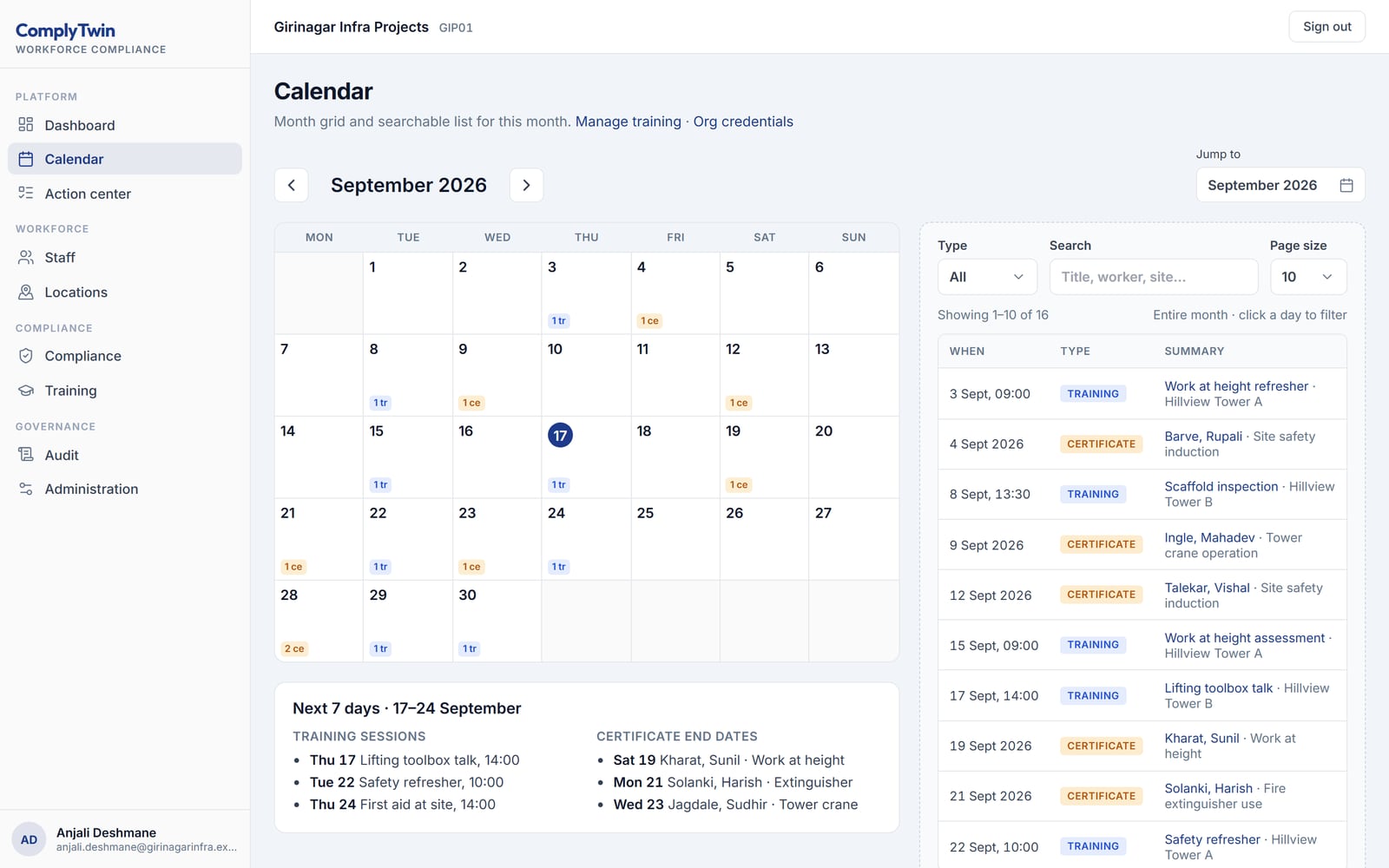
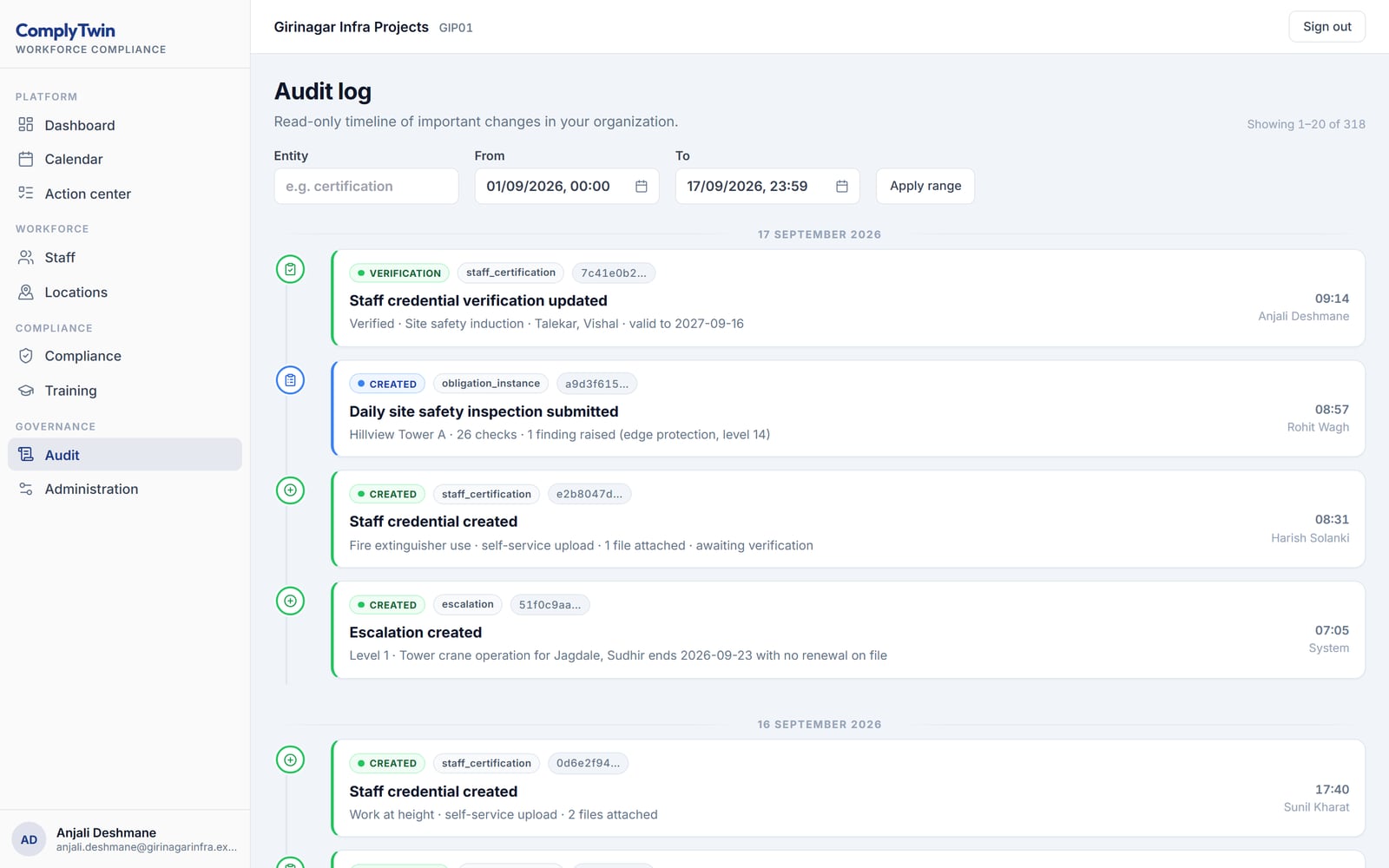
Every screen below is rebuilt from Comply's own interface and filled with a demonstration tenant's data. They are not captures of a live customer system.
Tap any picture to open it full size.
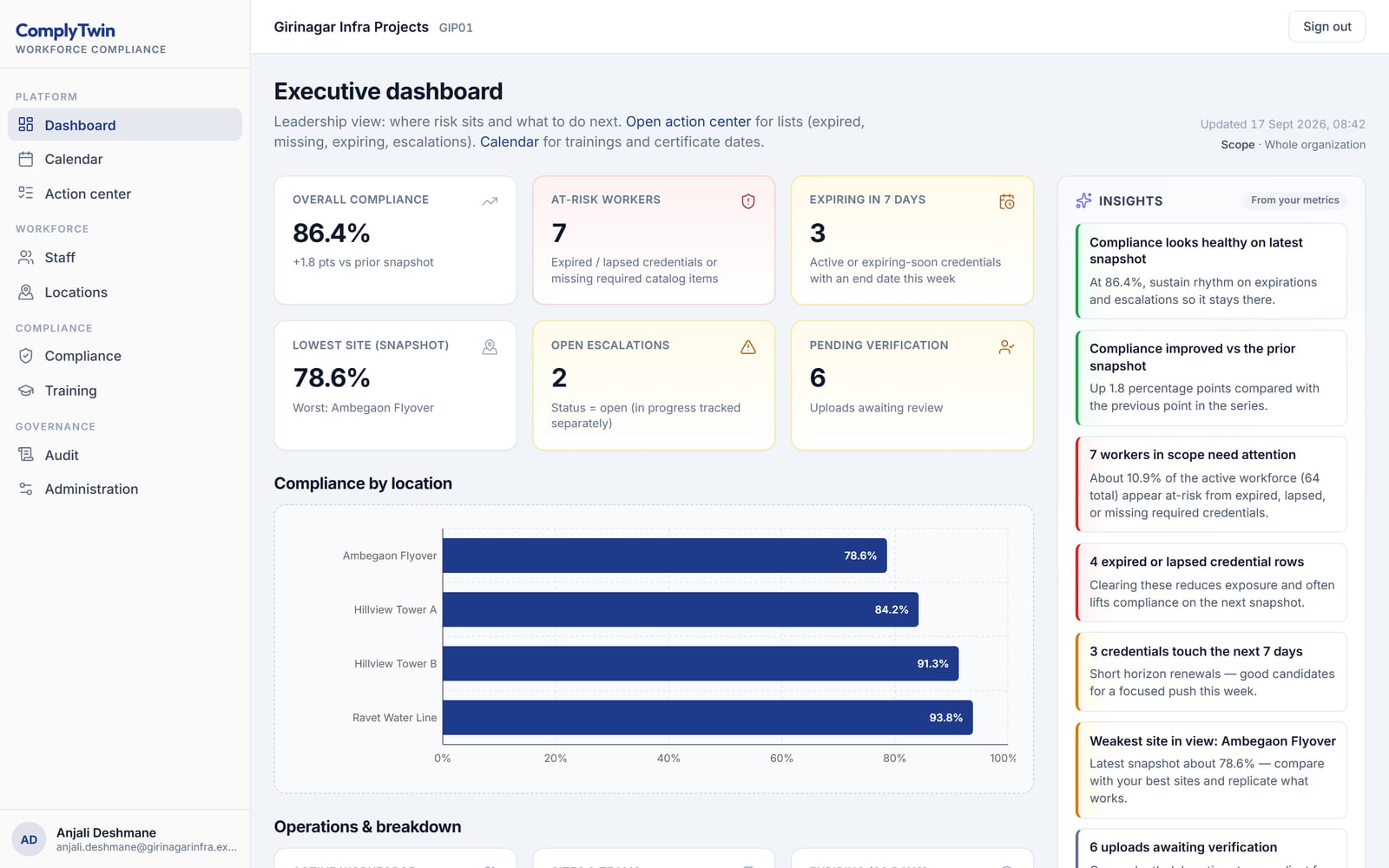
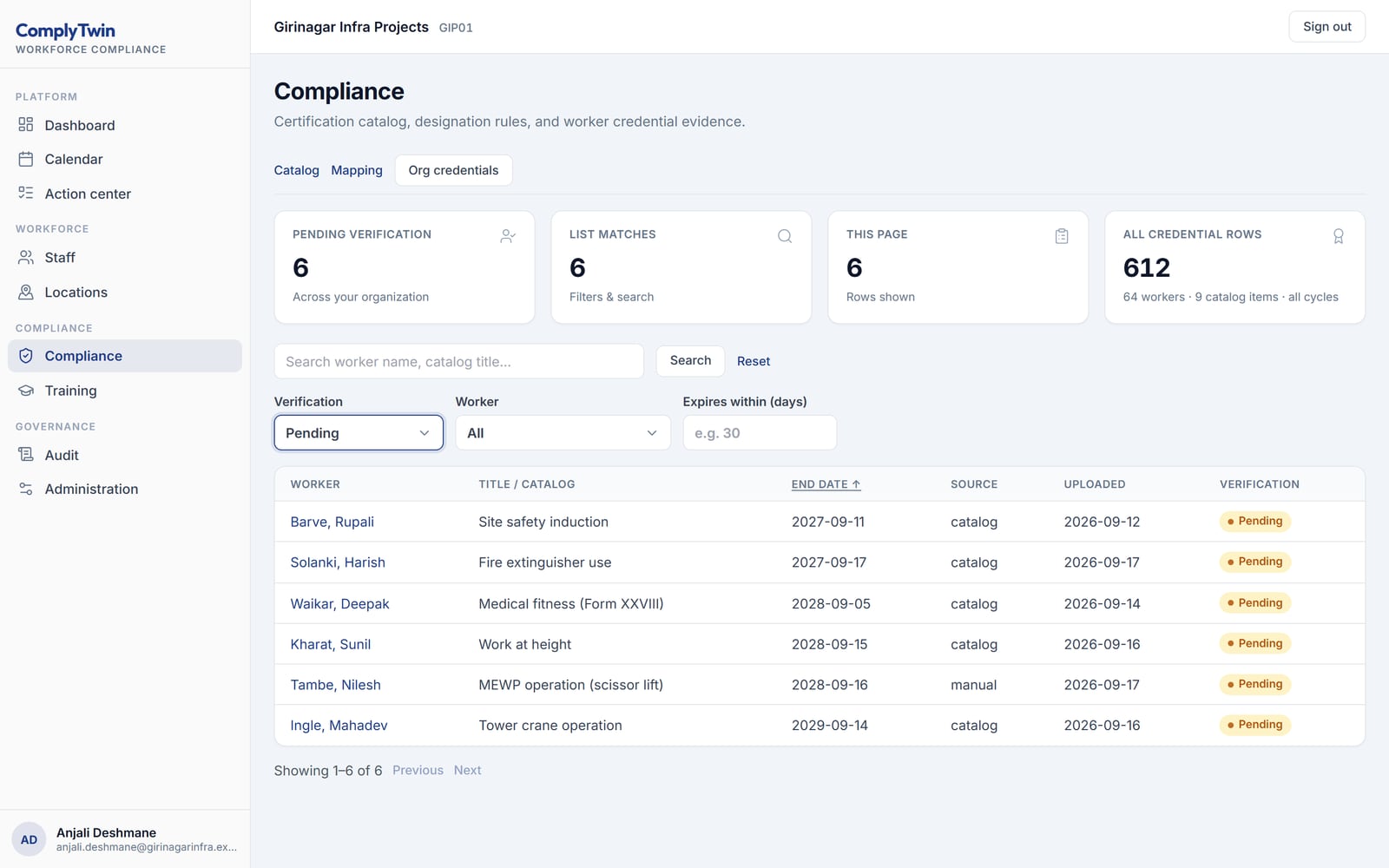
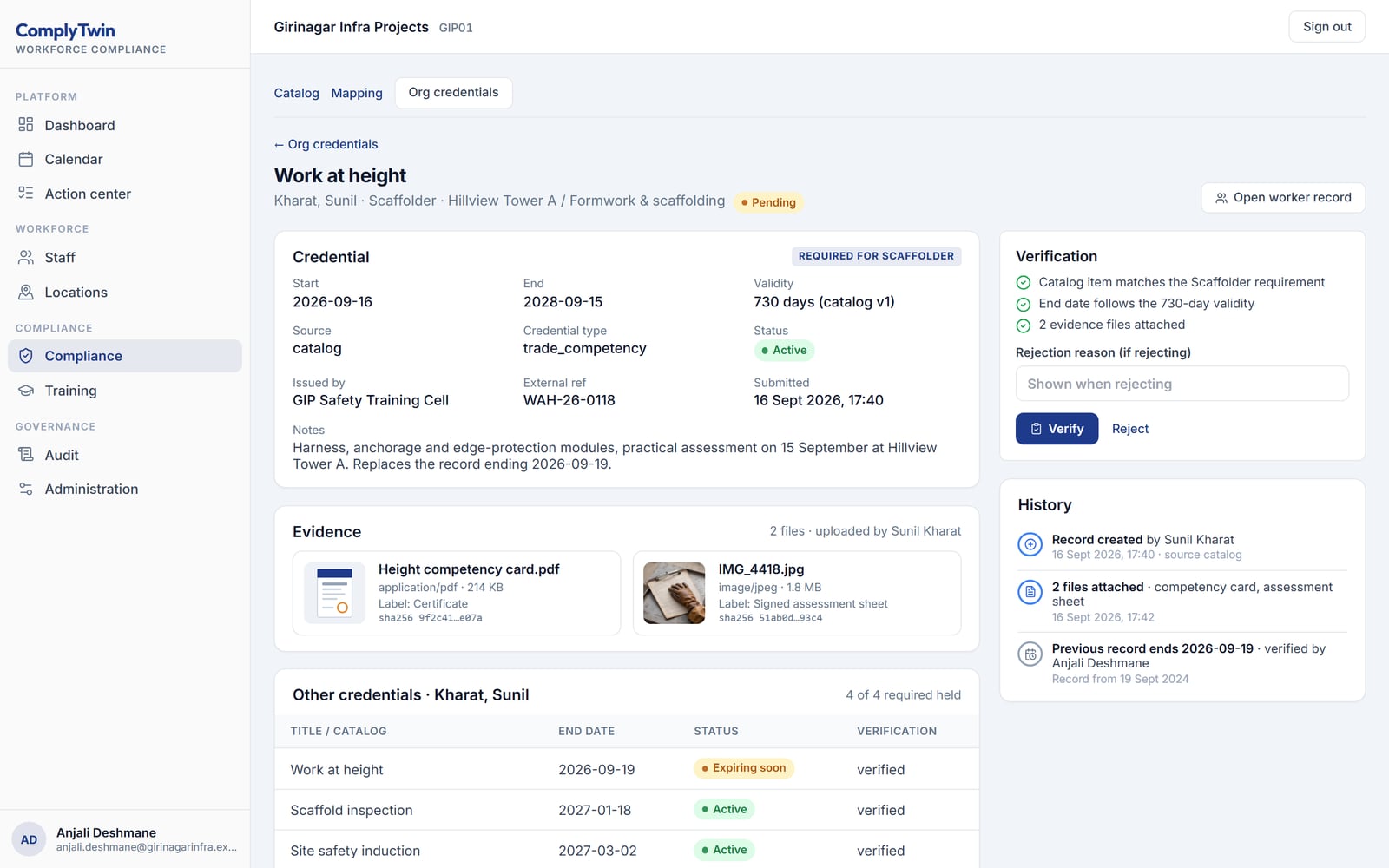
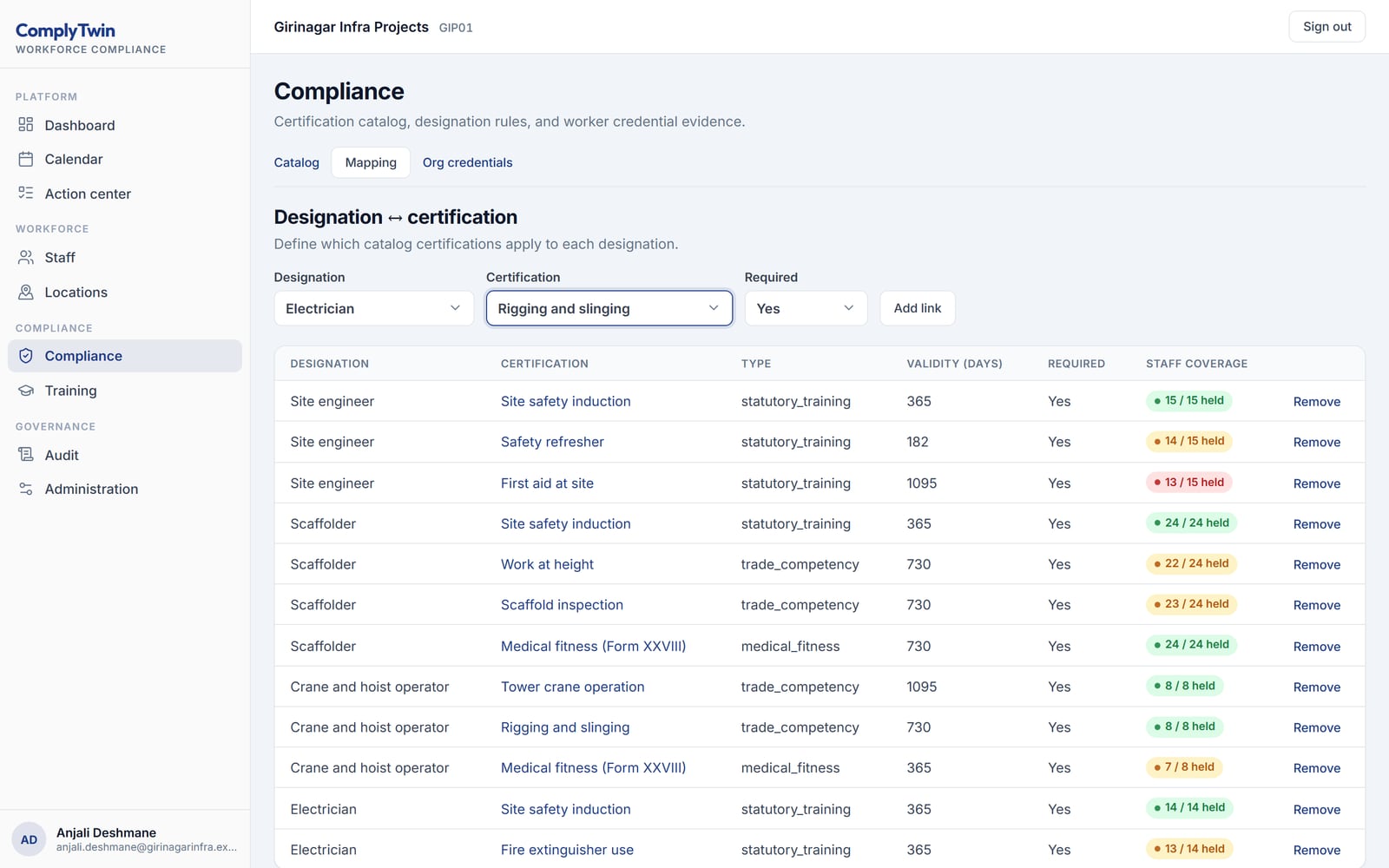
You get something made from your own material, within one working day, and no call unless you ask for one.
A PDF, a Word file, or a photo of the paper form. Within one working day we return it as it would look in Comply: each item with the evidence it needs and the date it expires.
Your enquiry is with the team. We read every one ourselves and normally reply within one working day.
If it is quicker to talk, reach us directly:
While you wait — the platform overview covers what each application does, and Insights is our writing on building this kind of software.
Would rather read than write? See the screens above, or the whole platform — seven applications, each one standing on its own.
Compliance is rarely lost because nobody cared. It is lost because the obligations sit in one spreadsheet, the certificates sit in an inbox, the inspection photographs sit on a phone, and nobody can say on any given Tuesday which of the three is out of date. The answer only arrives when an auditor asks for it, and by then preparation costs a fortnight.
Sazinga Comply puts obligations, evidence and expiry dates in one register. Each obligation has an owner, a frequency and a due date; each is closed by the document, photograph or signed checklist that actually proves it; and every verification records who did it and when. Audit readiness stops being a project and becomes a number you can look at.
Comply is in production at fourteen installations — six in the USA, five in the Gulf, two in the UK and one in Africa — across infrastructure, aviation, food and restaurants, and healthcare (September 2026). That is worth stating plainly, because compliance software bought on a promise is how organisations end up with two registers instead of none.
The healthcare workforce path is the most developed of them: a running application over a schema of thirty-three tables, covering staff, designations, the certifications each designation requires, certificate versions, training events and attendees, escalations and an audit log, with an API and portal behind it. The obligation register, the checklist engine and the evidence trail that serve the other sectors are the same core generalised — one engine running a food safety audit, a site safety inspection and a workforce check rather than three.
A property inspection is the case where the evidence matters most, because the person who relies on it was not at the building and reads what came back months later.
Creative Lending Solutions arranges finance against commercial property — hotels, gas stations, multi-family residential, franchises and retail centres. Before a loan is written somebody has to go and look at the building, and what comes back has to be good enough for an underwriter to rely on months later.
The mechanism is the one the vehicle handover in Sazinga Rentals uses, because it is the same problem: a condition recorded at a moment, by a named person, that nobody can quietly revise afterwards. The inspector works from a phone at the property. Photographs are taken in the app rather than chosen from a gallery, and each carries the coordinates and the time the shutter fired — not the time it reached the server, which is the field a dispute actually turns on when the phone had no signal at the site.
The back office sees each survey as it lands. For CLS we added a supervisor role: a manager sees what each member of staff has actually completed, rather than what the schedule says they were sent to do. That distinction is the whole reason the role exists.
The same shape serves a property manager in Goa running condition surveys across a portfolio, and AccuTax Pro, a US practice whose accounting and residential mortgage work carries survey and inspection obligations of its own, runs Sazinga products on a SaaS it controls.
Most of these deployments run under somebody else’s brand, so the operators cannot be named. What we can see, because the software is ours, is how hard it is worked: two to three surveys a day in each installation (September 2026). That is a working rhythm rather than a pilot, and it is the only claim about scale this page can honestly make — the rest of it sits inside another company’s product.
The figures below are the operator’s own, given in September 2026, for the effort one property takes from start to filed. They are ranges because the properties are not alike — a single retail unit and a hotel are not the same afternoon — and they are an estimate of practice rather than a stopwatch study. We publish them as that.
| Per property | Before | With the survey app |
|---|---|---|
| The site survey itself | 60–90 min | 45–60 min |
| A second visit for something missed | 60–90 min | 0–15 min |
| Organising and renaming photographs | 30–45 min | 0–5 min |
| Writing the survey report | 60–120 min | 15–30 min |
| Filing, emailing, sharing | 15–30 min | 2–5 min |
| Total | 3.5–6 hours | 1–1.75 hours |
The survey itself barely moves, and that is the honest part: walking a building takes as long as it takes. Everything that shrank was work that only existed because the first visit’s output was photographs on a phone and notes on paper.
The second visit is the line worth reading twice. It does not disappear because people became more careful; it disappears because a checklist with required items cannot be submitted with a gap in it, so the gap is found while the inspector is still standing in the building rather than a week later at a desk.
An obligation is a recurring duty with a source, a period, an owner and a defined artefact that closes it. That definition is the whole product, and each of those five words is a column.
An obligation record carries the instrument it comes from and the clause within it, so a finding can be argued back to the rule rather than to a policy document nobody has read. It carries a frequency — daily, weekly, monthly, quarterly, half-yearly, annual, event-driven or once — plus an anchor that says which day of that period, a due offset in days after the period closes, a reminder lead time, a grace period, a severity, and the kind of evidence that closes it: a form, a document, an acknowledgement, or nothing.
Crucially it carries an owner as a role at a scope, not a named person. An obligation owned by the site safety officer resolves, at generation time, to whoever holds that role at that site today. Staff turnover does not orphan a duty.
Nobody creates the recurring items. A scheduler function walks the active obligations for a period, works out each one’s period boundaries from its frequency and anchor, resolves the owner through the assignments at that scope, and writes an instance with a period start, a period end and a due timestamp. A second function marks the ones that have passed their due date and grace as overdue.
Instances exist per scope. An obligation defined at site level generates one instance per site, which is why a register of thirty obligations across five sites is a real workload figure rather than thirty rows that quietly stand for a hundred and fifty.
Event-driven obligations are generated by the thing that triggers them, and record what triggered them, so an incident produces its statutory notification instead of relying on somebody remembering that it should.
An instance closes against a submission, a document or a filed acknowledgement — a portal reference number and the date it was filed. It cannot close against a tick.
Submissions are versioned rather than overwritten: an edit made after submission writes a new revision with the change recorded, so the register that was true in August is still legible in March. And once an output has been produced from a submission — a register, a return, anything issued outside the organisation — the submission is locked by a database trigger, not by a convention. The document you filed and the record behind it cannot be made to disagree after the fact.
Findings work as an event stream. A finding’s state is the result of the events applied to it, so the history of a non-conformity is not something reconstructed from a status column that was edited four times.
Two mechanisms, both in the database rather than the application.
The audit log is append-only and hash-chained: each entry incorporates the one before it, so deleting or altering a past entry breaks the chain and the break is detectable. Append-only enforcement is a trigger on the table, which means it applies to anything that writes — a script, a console, a future feature — and not only to the code that remembered to behave.
Tenant isolation is enforced by Postgres row-level security, keyed on an organisation identifier set per transaction. The application role cannot bypass it. Without that value set, every tenant-scoped table returns zero rows — the failure mode is an empty screen, not another organisation’s staff list.
Access within a tenant is built from forty-five permissions and seven system roles, and a tenant can define roles of its own on top. Sector-specific content arrives as a domain pack that is cloned into the organisation: obligation templates, form definitions and lookups for that industry, which the organisation then edits as its own rather than receiving as an untouchable default.
It does not file anything for you. There is no integration that submits a return to a regulator’s portal; Comply records that the filing happened, by whom, and with which reference. It does not interpret regulation either — the obligation templates in a domain pack are a starting register built from published instruments, and they need a compliance officer to confirm which apply.
It is not a document management system, not a learning management system, and not a health and safety incident investigation tool. It knows a training event happened and that a certificate resulted; it does not deliver the training. That gap is what Sazinga Engage does.
The domain packs seeded so far cover construction and aviation training, and the workforce path covers healthcare. Read the operating context on the construction, food safety and healthcare pages. If your compliance problem is really a traceability problem — which batch, which lot, which customer — that is Sazinga Factory rather than this.
Swipe for the other screens.


Every obligation an organisation carries, held in one register with its owner, its frequency and its next due date. What is due this week, what is overdue and what is unassigned is a query rather than a chase.
An obligation is closed by attaching the thing that proves it, a certificate, a photograph, a signed checklist or a test result. Each item records the person who verified it and the date they did so.
Licences, training records, insurance and equipment certificates each carry an expiry date. Warnings are raised on a schedule you set before the lapse, so renewal happens ahead of the date rather than after it.
The same checklist engine runs a food safety audit, a site safety inspection and an internal review. Findings become non-conformities, each with an owner, a due date and a corrective action that must be evidenced to close.
Property inspection and collateral condition surveys, safety and EHS inspections, facility and building inspections, equipment and asset inspections, and food safety audits, all on one checklist engine rather than one product each. An inspection type is a checklist, a cadence and the evidence that closes it, so adding a type is configuration rather than a new deployment.
The inspector works on a phone at the property — photographs taken at the point of capture with their location and time attached, not uploaded from a gallery afterwards. The back office sees every survey as it lands. A supervisor role, built for a US lending client, shows what each member of staff has actually done rather than what the rota says they were sent to do.
Each of these is a real problem from a live installation, what it cost, and what changed.
Permits to work are issued on paper in the site cabin, method statements go out of date on site, and induction records sit in a folder nobody can search.
HACCP checks are signed on paper, corrective actions close without evidence, and nobody knows which site is overdue an inspection until the auditor is already on it.
Professional registration dates live in a spreadsheet, mandatory training lapses unnoticed, and inspection evidence is assembled in the fortnight before a visit.
Sazinga Comply is compliance, audit and inspection management software. It holds an organisation's recurring obligations in one register, records the evidence that closes each one, tracks certificate and licence expiry dates, and keeps a full trail of who verified what and when.
Property inspection and collateral condition surveys, safety and EHS inspections, facility and building inspections, equipment and asset inspections, and food safety audits. They are not separate products — an inspection type is a checklist, a cadence and the evidence that closes it, so the same engine runs all of them and a new type is configured rather than built. Findings become non-conformities with an owner, a due date and a corrective action that has to be evidenced before it closes.
It is built to be industry-neutral. The same obligation register, checklist engine and evidence trail serve food safety audits, building and infrastructure inspections carried out by safety inspectors, and healthcare workforce compliance. Terminology and checklists are configured per organisation.
It is in production, at fourteen installations — six in the USA, five in the Gulf, two in the UK and one in Africa — across infrastructure, aviation, food and restaurants, and healthcare. The healthcare workforce path is the most developed of them, covering staff certification, training records and expiry tracking; the audit and inspection paths for other sectors run on the same core.
Each certificate, licence and training record is stored with an expiry date and an owner. Warnings are raised on a schedule set per certificate type, ahead of the expiry date, and an item past its date is flagged as non-compliant until a replacement is uploaded.
For every obligation and every piece of evidence, it records who uploaded or verified it, what was attached, and the date and time. The trail is append-only, so a past verification remains visible even after the obligation is re-evidenced in a later cycle.
Yes. Inspections are completed against a checklist, with photographs attached to individual line items. A failed item becomes a non-conformity with an owner and a due date, and stays open until a corrective action with its own evidence closes it.