
Customers, orders and pricing
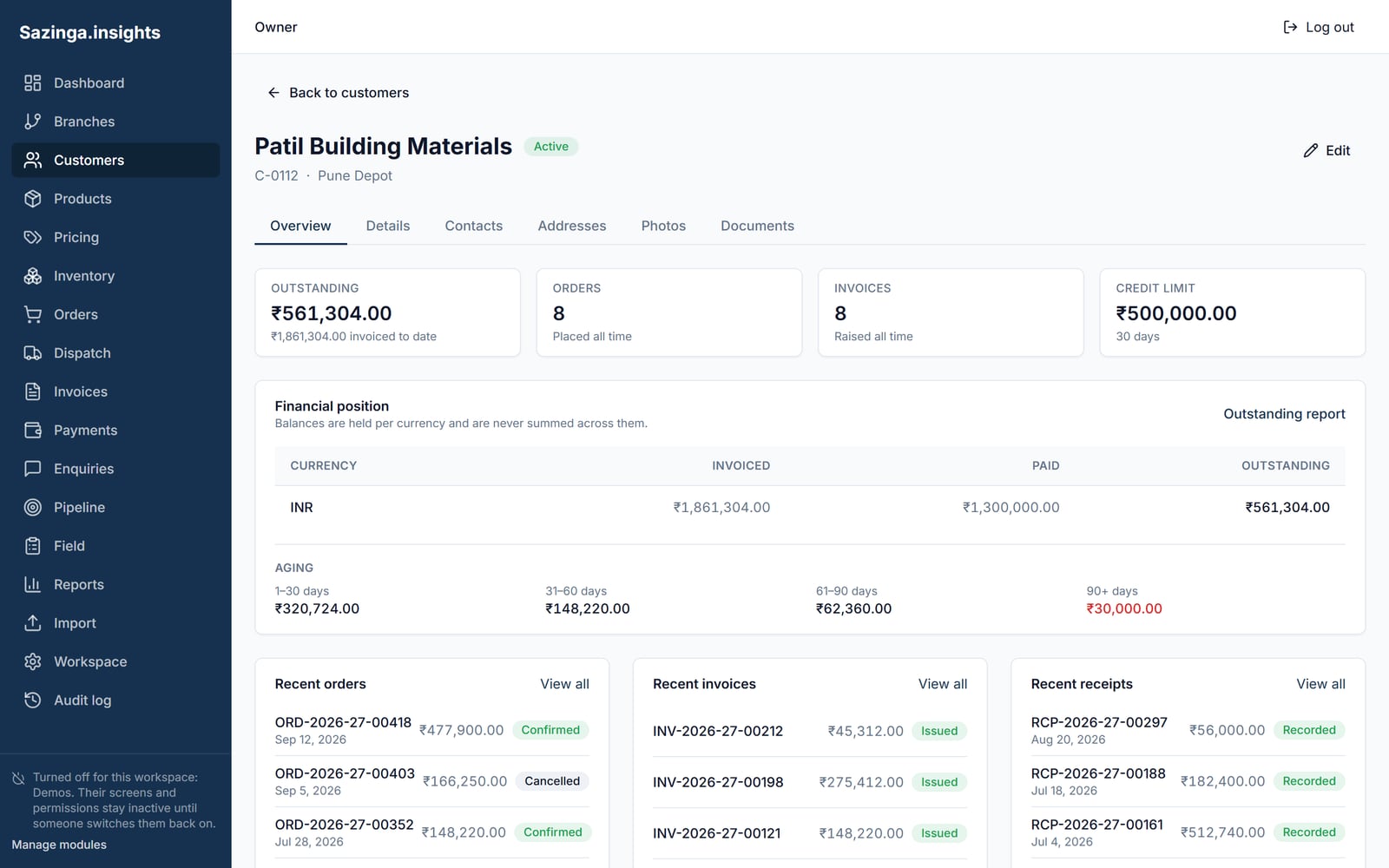
Dealers, distributors and retailers in one customer record, with their price list, credit terms and order history. An order taken on a phone in a shop is the same order the office sees, with no re-keying.
Sazinga Sarva · Operations
Orders, stock, dispatch and the people on the road, in one place
Manufacturers and distributors selling through dealers, distributors and a field sales team
Already using Field? Sign in
In production — Deployed white-label, so the installations cannot be named.

Selling through dealers and a team on the road tends to run on three disconnected systems. Orders arrive by message and get re-keyed, stock figures are a day old by the time anyone quotes them, collections are reconciled from paper receipts, and nobody can say with confidence which customers a field executive actually visited last week.
Sazinga Field joins the order, the stock it draws on, the dispatch that follows and the invoice that closes it. Dealers order for themselves, field executives order on their behalf, and the office sees one record either way rather than a message thread and a typed copy of it.
Field is in user acceptance testing ahead of general release. The platform it is being productised from is a working distributor system with a real dealer network on it, and the work in front of it is packaging rather than invention — but it is not yet a product you can sign up for, and the section at the end of this page on what it does not do is the important one.
The order that arrives as a photograph of a handwritten sheet. The stock figure quoted from memory. The visit that happened, or did not, depending on who you ask. And the month-end exercise of matching dispatches to invoices to work out what a dealer owes.
An order is created against a dealer, by that dealer or by the representative who took it, and it carries the shipping address, the billing address and the person who created it from the moment it exists. The commercial detail sits on the same record: subtotal, the scheme or coupon applied, the discount that produced, the GST percentage and amount, and the final payable figure.
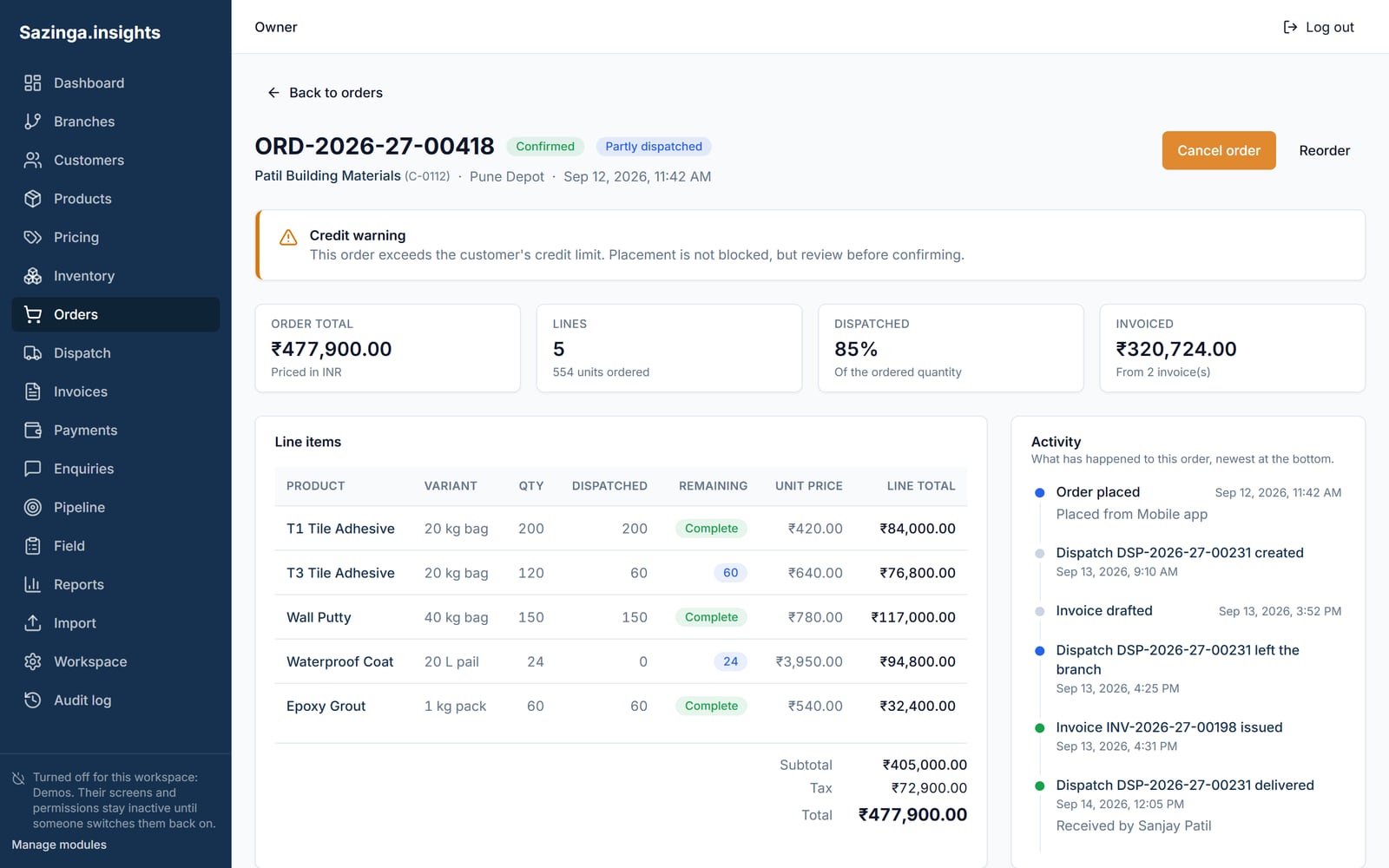
Dispatch is a separate record against that order, with its own code and date, its own lines, and the invoice raised for it — number, date, amount, amount including GST, and the invoice document itself. An order can be flagged as partial, so a dealer who received half an order is looking at an order that says so rather than at two orders that have to be mentally rejoined.
The chain is therefore order to dispatch to invoice, each stage a row that points at the one before it. Nothing in it requires re-keying, which is the entire argument.
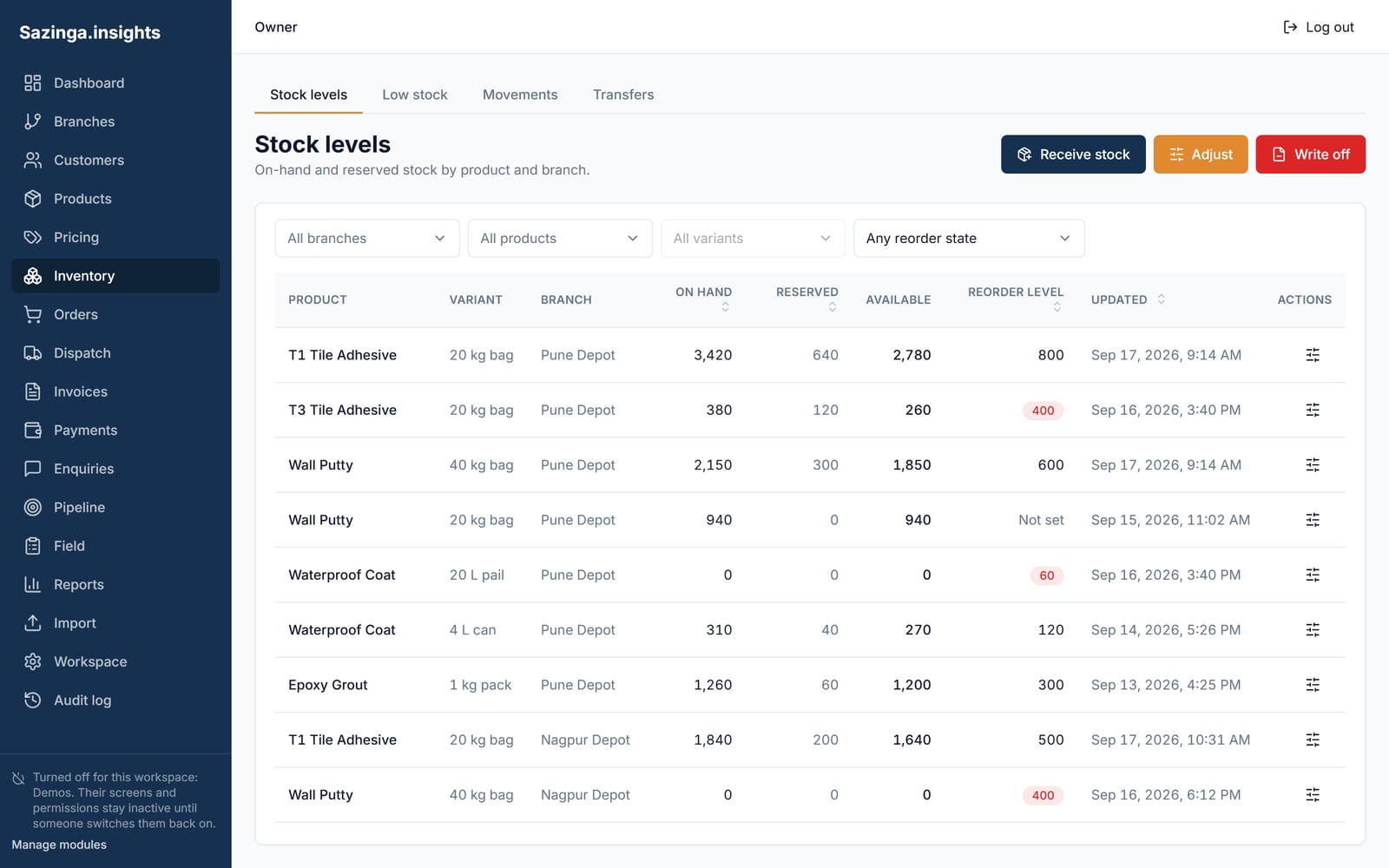
Stock is held per depot and per pack type, as a current figure with the time it was last updated recorded beside it. That timestamp is doing real work: a stock figure without one is a number of unknown age, and a distributor quoting from an unknown-age number is guessing.
This is deliberately a simpler model than a full movement ledger, and it comes with the trade-off that goes with it — you can see what stock is, but not the sequence of movements that produced it. Where that matters, because the question is what went into which batch, that is Sazinga Factory, which is built the other way round.
A task carries a code, a type, the person it is assigned to, the dealer it is against, a planned date and a due time. When it is completed it carries the completion time, the notes taken, a summary of the action agreed, and the latitude, longitude and place label it was completed at.
That combination is what makes coverage answerable. Planned work and completed work are not two lists to be compared; they are the same row before and after, so “which of this week’s planned calls actually happened, and where was the executive standing when they closed them” is a query.
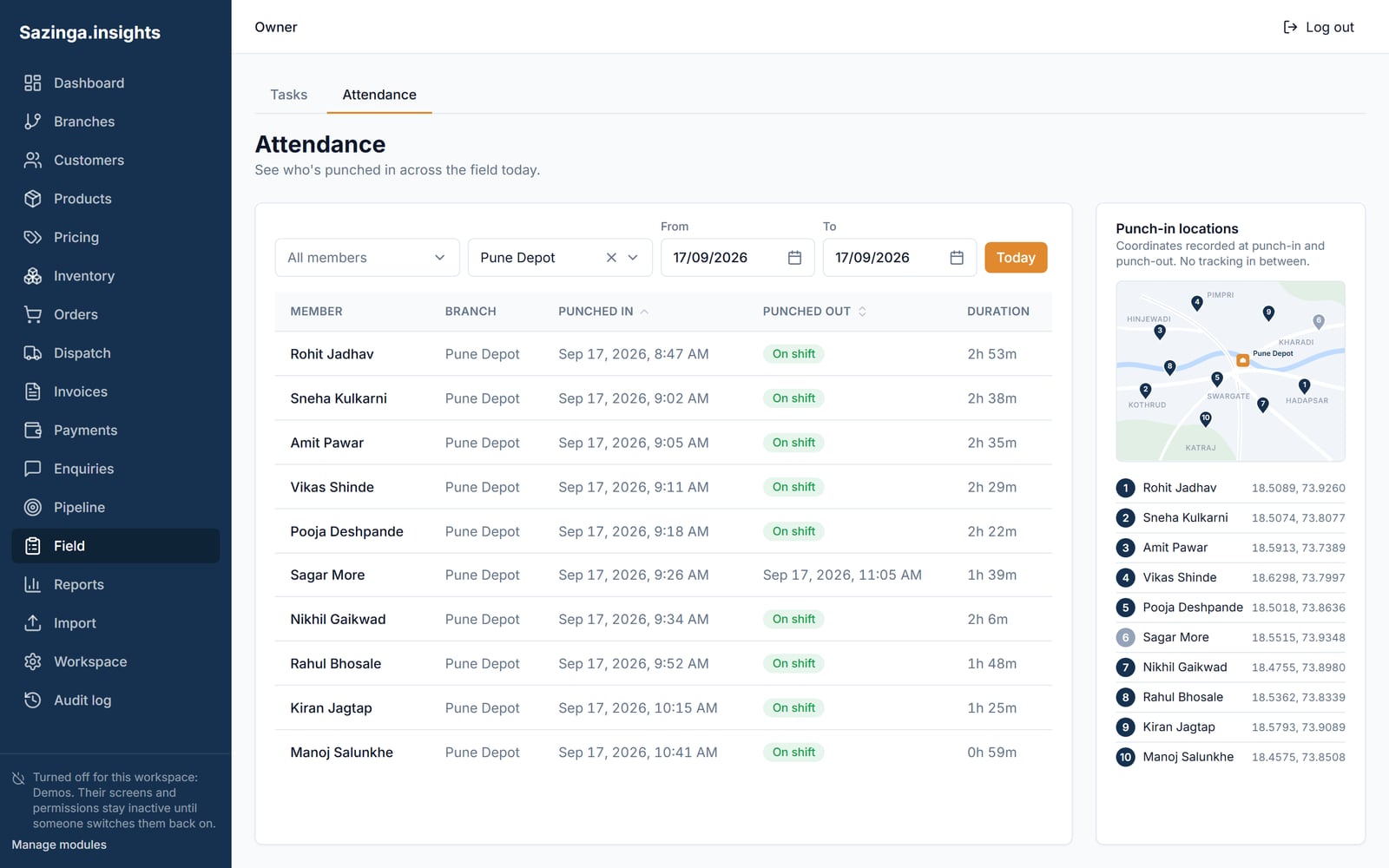
Attendance is separate and works the same way: a shift start with its date, time and coordinates, a shift end with its own, the depot it was worked from, and a record of who ended it — because a shift ended by a supervisor rather than by the executive is a different fact from one the executive closed themselves.
Access is built from 190 individual permissions across 27 modules, and the distinctive part is that a permission can declare the permissions it depends on. Granting the right to update a category is meaningless without the right to view categories, so the dependency is held on the permission itself rather than left to whoever builds the role to remember.
Every business table also carries the user who created the row, the user who last updated it, both timestamps, and the IP address and host the write arrived from. That last pair is unusual and worth having: when a dealer disputes an order, the answer includes where it was placed from.
Distributors in several sectors sell an advance commitment at the start of a financial year, and it is usually run on paper because it does not look like an order.
Here it is its own record: a booking against a fiscal year and a dealer, with a total value, a token amount, a payment link, a generated letterhead and agreement, a serial number, and an explicit confirmation by the distributor before it counts as accepted. Dealer loyalty tiers, with the history of movement between them, sit alongside it, as do commission structures held as slabs — a rate that applies between a lower and an upper value rather than a single flat percentage.
The mobile app is not offline-first. It detects the connection and tells the user when it is missing, rather than accepting work it cannot save. That is an honest guard and not a substitute for a durable local queue, which is roadmap. Offline is a contract, not a feature, and half-implementing it is worse than not claiming it.
There is no continuous location tracking, no geo-fencing and no route or distance logging. Location is captured at the two shift boundaries and at the moment a task is closed — three points, not a trail. If you are buying a system to watch a map of your team moving in real time, this is not it, and we would rather lose that deal than win it.
It is also not an accounting package. It records the invoice raised on dispatch; it does not keep a general ledger, and a customer-ageing report with receipts, part payments and credit notes is not part of the current build.
The distribution industry page covers the operating problems this was built against, and the distributor network case study covers one network in detail. If the make side is your problem rather than the sell side, start with Sazinga Factory; if your field team’s job is proof of display rather than orders, that is Sazinga AdBoard.
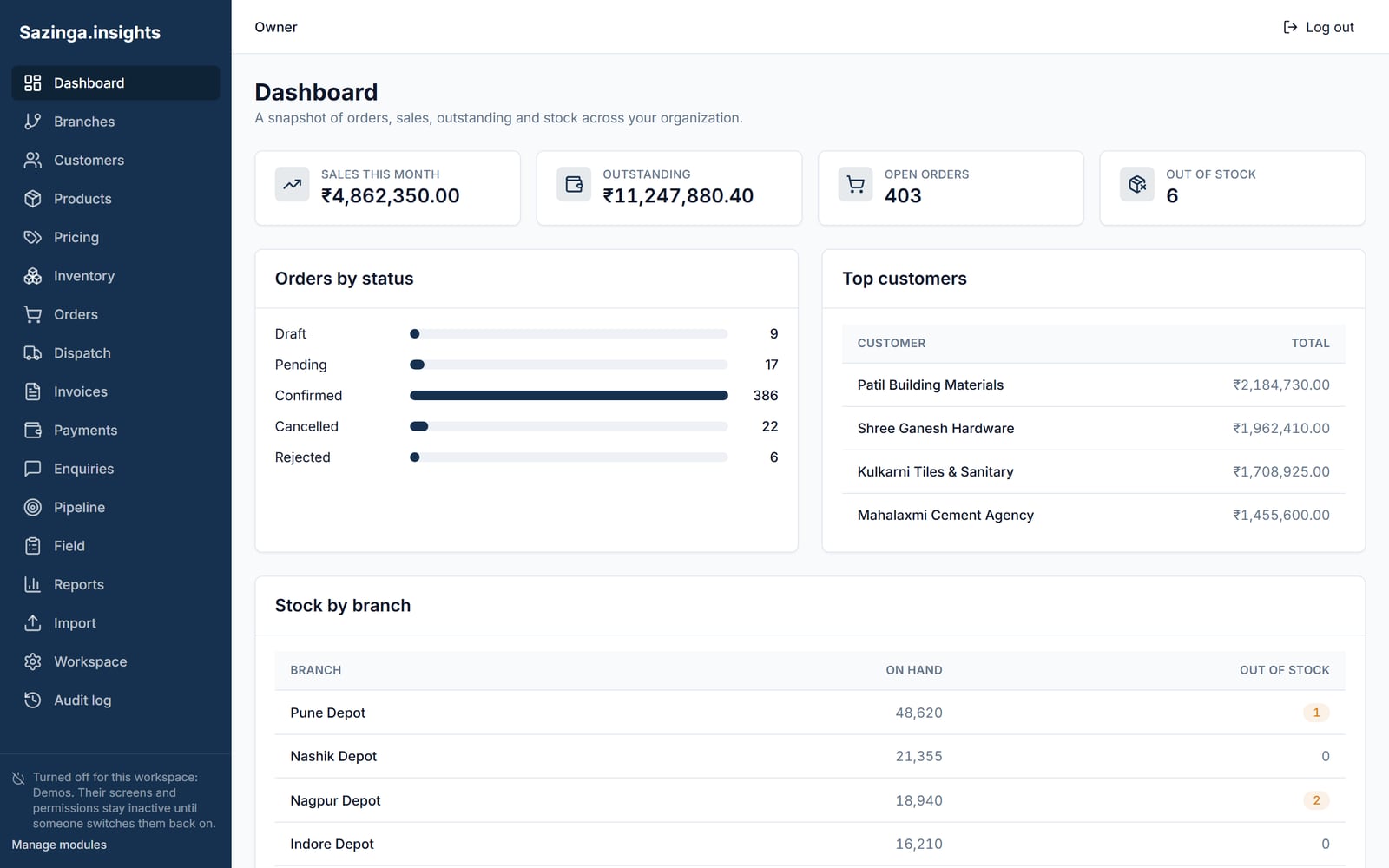
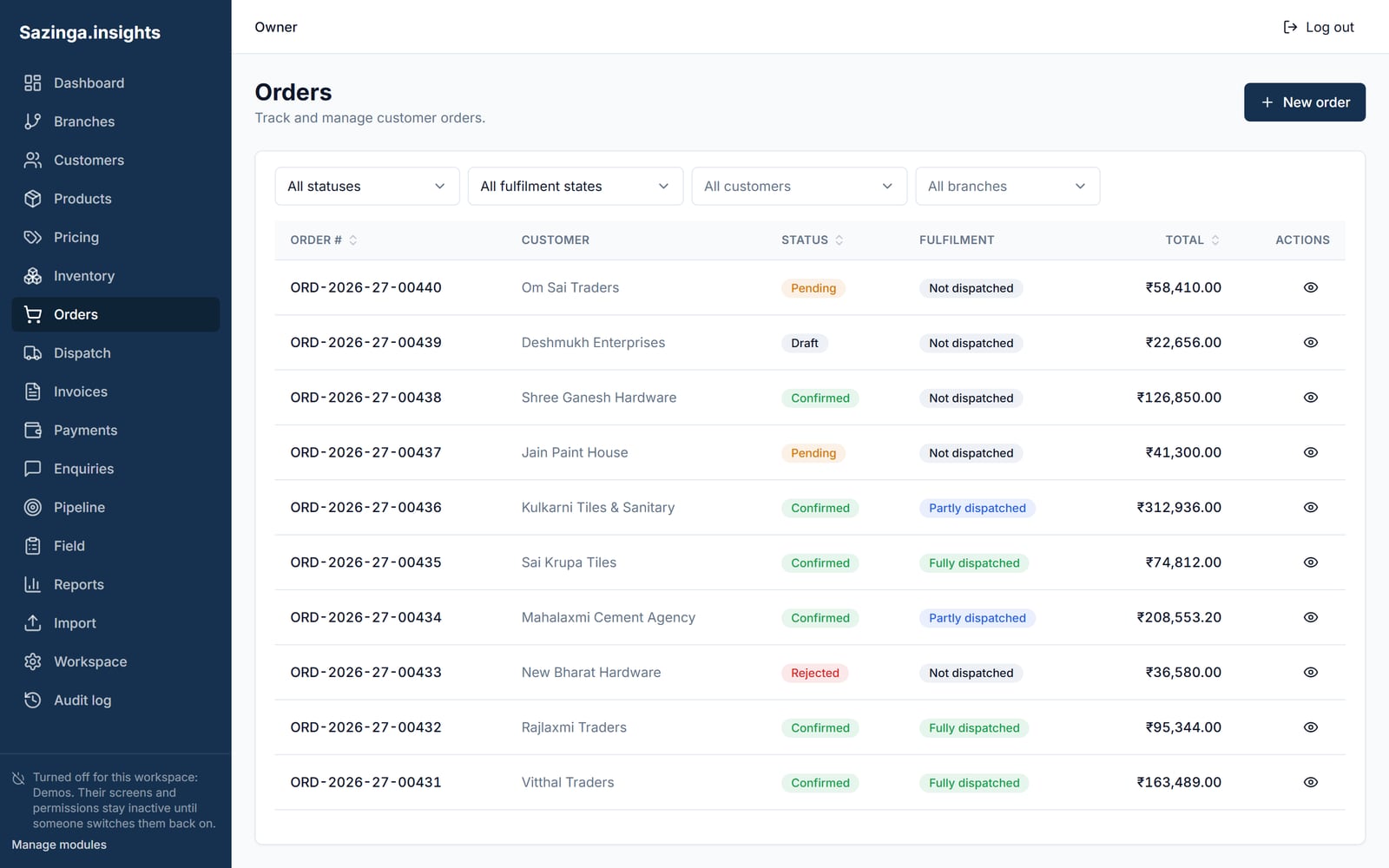
Every screen below is rebuilt from Field's own interface and filled with a demonstration tenant's data. They are not captures of a live customer system.
Tap any picture to open it full size.
Swipe for the other screens.


Dealers, distributors and retailers in one customer record, with their price list, credit terms and order history. An order taken on a phone in a shop is the same order the office sees, with no re-keying.
Stock held per depot and per pack type, with the time it was last updated on the record itself. Dispatch turns an order into a dispatch record and its invoice without a second data entry, and a part dispatch stays visibly part of the order it came from.
Shift attendance with the coordinates it was started and ended at, and tasks carrying a planned date, a due time, the dealer they are against and the coordinates they were completed at. Planned work and completed work are the same record, so coverage is a query.
An order carries its subtotal, the scheme or coupon discount applied, the GST breakdown and the final amount, and the invoice raised on dispatch carries its own number, date, amount and document. Order value and invoiced value are held on the same chain rather than reconciled between two.
Related work
Sazinga Field is distributor and field sales management software for manufacturers and distributors. It handles dealers and distributors, orders and schemes, depot stock, dispatch and the invoice raised against it, annual advance booking, and a field team whose shifts and completed visits are stamped with the coordinates they happened at.
Manufacturers and distributors that sell through dealers, distributors or retailers and run a field sales team on the road. It suits businesses where orders are taken in person rather than through a web storefront.
Not today. The React Native app detects the connection and tells the user when it is absent rather than accepting work it cannot save. A durable local queue for orders, visits and attendance is on the roadmap and is not shipped, and we would rather say so than have a field executive discover it after six orders.
It handles the advance booking schemes distributors run at the start of a financial year. A booking is made against a fiscal year and a dealer, carrying its total value, the token amount paid, a payment link, the letterhead and agreement documents generated for it, and an explicit confirmation step by the distributor before it counts.
A shift start and end, each with its date, time and coordinates, and the depot it was worked from. Then for each task, its type, the dealer it is against, the planned date and due time, the completion time, the notes and action summary taken, and the coordinates and place label it was closed at. Location is captured at those points rather than streamed continuously.
Access is granted per module and per role rather than by a single blanket level. A field executive, a dispatch clerk, an accounts user and an owner each see a different set of screens and actions within the same tenant.
This page is written for manufacturers and distributors selling through dealers, distributors and a field sales team. Field is in customer trials, on customers’ own data, so it is still moving and you would be shaping it. Describe how orders, depot stock and dispatch are kept in step now, what gets re-keyed on the way, and what arrives too late to act on.
Your enquiry is with the team. We read every one ourselves and normally reply within one working day.
If it is quicker to talk, reach us directly:
While you wait — the platform overview covers what each application does, and Insights is our writing on building this kind of software.
Would rather read than write? See the screens above, or the whole platform — seven applications, each one standing on its own.